Fill out your 2026 W-4 right on the official IRS form.
Type each answer where it prints on the W-4, with a plain-English note beside every step, based on the IRS instructions. Then download page 1 for your employer.
- A note beside every step, based on the IRS instructions
- Your employer gets page 1; the worksheets stay with you
- Sign on screen, or leave the line for ink
Built on the IRS’s own PDF · 2026Not affiliated with the IRS
Which steps are yours?
Tick the ones that apply — their steps light up on the form.
Your steps
- 15
- Steps 1 and 5 — for everyone
- 1(a)1(b)5
- Steps 1(a), 1(b) and 5 — with Exempt, nothing else
- 2
- One of three ways: the IRS estimator, the page 3 worksheet, or the 2(c) box — the box only with two jobs in total, ticked on both W-4s
- 3
- Children under 17 × $2,200, other dependents × $500 — with income of $200,000 or less ($400,000 filing jointly)
- 4
- (a) Other income, not from jobs · (b) deductions other than the basic standard deduction · (c) extra tax each pay period
- Exempt
- Only with no federal income tax liability in 2025 and none expected in 2026
Exempt means leaving Steps 2–4 empty: the form says “Do not complete any other steps.”
Based on the form’s own steps. Form W-4, p. 1, p. 2; Pub. 15, p. 25
Who fills it in
Employees — Steps 1 and 5 apply to every one of them. More than one job? A separate W-4 for each job.Pub. 15, p. 25; Form W-4, p. 2
- A nonresident alien? Read Notice 1392 before you fill it in.
- Asked for your taxpayer ID by a payer? That’s a Form W-9.
Where it goes
To your employer. The form says: “Give Form W-4 to your employer.”Form W-4, p. 1
Why it matters
Too little withheld, and you will generally owe tax when you file — and may owe a penalty. A form not properly completed is treated as “a single person with no other entries on the form”.Form W-4, p. 2, p. 4
When to give a new one
When changes in your personal or financial situation would change your entries. Claimed Exempt? A new one by February 16, 2027.Form W-4, p. 2
What goes in each step of the W-4
Steps 1 and 5 are for everyone; Steps 2–4 only if they apply to you. Notes like these sit beside each step while you fill.
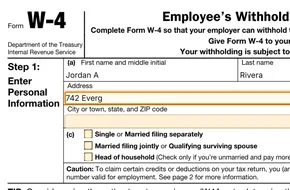
Personal informationStep 1
- 1(a)
Step 1(a) · Name and address
Your first name and middle initial, last name, and address with city or town, state and ZIP code.Form W-4, p. 1; Pub. 15-T, p. 4
- 1(b)
Step 1(b) · Social security number
Beside the box the form asks: “Does your name match the name on your social security card?” If not, it points you to SSA so you get credit for your earnings. An ITIN does not go here.Form W-4, p. 1; Notice 1392, p. 2
- 1(c)
Step 1(c) · Filing status
“Check your anticipated filing status. This will determine the standard deduction and tax rates used to compute your withholding.” Head of household only if you’re unmarried and pay more than half the costs of keeping up a home for yourself and a qualifying individual.Form W-4, p. 1, p. 2
Only if they apply to youSteps 2–4
- 2
Step 2 · Multiple jobs or spouse works
The form says: “Complete Steps 2–4 ONLY if they apply to you”. Pick one of three ways: the IRS estimator, the worksheet on page 3, or the box in 2(c) — the box only with exactly two jobs in total, and ticked on the other W-4 too.Form W-4, p. 1, p. 2
- 3
Step 3 · Dependents and other credits
Income of $200,000 or less ($400,000 or less married filing jointly): qualifying children under 17 × $2,200, other dependents × $500. With more than one job, fill Steps 3–4(b) “for only ONE of these jobs” — withholding is most accurate on the W-4 for the highest paying job.Form W-4, p. 1
- 4
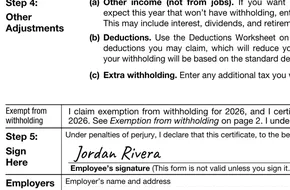
Step 4 · Other adjustments
(a) Other income, not from jobs. (b) Deductions other than the basic standard deduction — itemized deductions and others “such as for qualified tips, overtime compensation, and passenger vehicle loan interest”; the page 4 worksheet works out the amount. (c) Extra tax to withhold each pay period. A nonresident alien writes “Nonresident Alien” or “NRA” below 4(c).Form W-4, p. 1, p. 2, p. 4; Pub. 15, p. 27
Exempt from withholdingInstead of Steps 1(c)–4
- Exempt
Exempt · Exemption from withholding
Only if you had “no federal income tax liability in 2025” and expect “no federal income tax liability in 2026”. Then complete only Steps 1(a), 1(b) and 5. “You will need to submit a new Form W-4 by February 16, 2027.”Form W-4, p. 2
Signature, and the employer’s partStep 5 · Employers Only
- 5
Step 5 · Sign here
“This form is not valid unless you sign it.” Sign on screen and date it, or leave the line for ink.Form W-4, p. 1; Pub. 15-T, p. 4
- Employers
Employers Only · Filled by your employer
Your employer’s name and address, your first date of employment and the employer’s EIN. Your employer fills this in.Form W-4, p. 1
Every one of these notes waits beside its step.Fill the official W-4 in your browser, then download page 1.
Start filling outW-4 questions, answered
Short answers, based on the IRS form and publications where they apply.
Do I have to sign it?
Yes. The form says: “This form is not valid unless you sign it.” Employers expect a dated signature in Step 5. Sign on screen and date it, or print and sign in ink — check that your employer accepts an electronic signature.Form W-4, p. 1; Pub. 15-T, p. 4
Do I send my W-4 to the IRS?
No. The form says: “Give Form W-4 to your employer.” An employer “may also be directed to send certain Forms W-4 to the IRS” — that is between your employer and the IRS.Form W-4, p. 1; Pub. 15, p. 27
What if I leave parts of it empty?
Steps 2–4 are only for people they apply to. Step 1 and Step 5 apply to all employees, and a form that isn’t properly completed means “being treated as a single person with no other entries on the form”.Form W-4, p. 1, p. 4; Pub. 15, p. 25
Do I need a new W-4 every year?
Only when changes to your personal or financial situation would change the entries on the form. Claiming exemption is the exception: “You will need to submit a new Form W-4 by February 16, 2027.”Form W-4, p. 2
I have two jobs. What do I do?
Submit a separate W-4 for each job. Use one of Step 2’s three ways — with only two jobs in total you may tick 2(c), then tick it on both W-4s. Fill Steps 3–4(b) on only one of them; withholding is most accurate on the W-4 for the highest paying job.Form W-4, p. 1, p. 2
Will you submit the form for me?
No. You download page 1 and give it to your employer yourself. Nothing is sent on your behalf.
What happens to my draft?
Your answers save to your own draft on our servers as you type, over an encrypted connection. A guest draft is deleted 24 hours after it’s created; with an account, 30 days after you last use it. Delete your draft whenever you like.
Five things to have at hand
- Your social security numberAn ITIN can’t go in Step 1(b)
- Your address
- The filing status you expect to use this year
- Your most recent pay stubThe form suggests it if you use the IRS estimator
- The other job’s pay, if Step 2 appliesThe page 3 worksheet uses both jobs’ yearly wages
Upload your own PDF
For any other PDF: fill it in and sign it in the PDF editor.
The IRS’s own form, with notes you can check
The IRS’s own form
Built from the IRS’s own file (2026). Your answers go into its own boxes.
Protected as you type
Your answers travel over an encrypted connection to your own draft.
Notes you can check
Each note on this page names the IRS form page or publication it is based on.
You hand it in
We don’t send the form to anyone. You download page 1 and give it to your employer yourself.
Official sources
The IRS documents this page quotes.
From blank form to your next step
- STEP 1
Fill in directly on the form
Type your answers where they print, with a short note beside every field.
- STEP 2
Sign, or leave the line for ink
Add a signature on screen, or mark the form to be signed by hand after printing.
- STEP 3
Download and hand it in
Get your PDF, print it if you need to, and give it to whoever asked for it.
Official, protected, in your hands
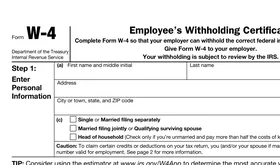
The official form
Built from the 2026 Form W-4 published on irs.gov.

Protected, then deleted
Your answers go to your own draft over an encrypted connection. A guest draft is deleted 24 hours after it’s created; with an account, 30 days after you last use it.
You stay in control
We help you fill it in. You choose where it goes and hand it in yourself — nothing is sent on your behalf. Delete your draft whenever you like.
Who is behind Eliten Forms
A private company, not a government site.
Applabel LTD, Cyprus (EU)
The company that runs eliten.ai, registered in Cyprus. The EU’s data protection rules (GDPR) apply.
Not affiliated with any agency
We are not the IRS or the California DMV. The forms are built from the files they publish.
Questions? Write to us
About a form or your draft: eliten@support-team.app
Privacy and Terms
How we handle your data, in full: Privacy Policy · Terms of Use
Fill out your 2026 W-4 on the official form.
Every step has its note beside it. Download page 1 when you’re done and give it to your employer.
Start filling out