
You typed “cat on a windowsill” into an AI image generator and got a lopsided ginger blob staring into what might be a lamp. Not the vibe you wanted. The tool worked. Your image prompt did not.
An image prompt is the whole creative brief you hand to the AI. Subject, style, lighting, framing, atmosphere, aspect ratio. Get those right and the same prompt helps you create images you would put on a landing page. Get them vague and you create lamp-cat.
This beginner guide walks through what an image prompt is, how AI image generation works, a 6-part prompt structure that holds up across AI models, prompt examples for photos and illustration, and how to reverse-engineer any photo back into a prompt using an image to prompt generator.
What does image prompt mean?
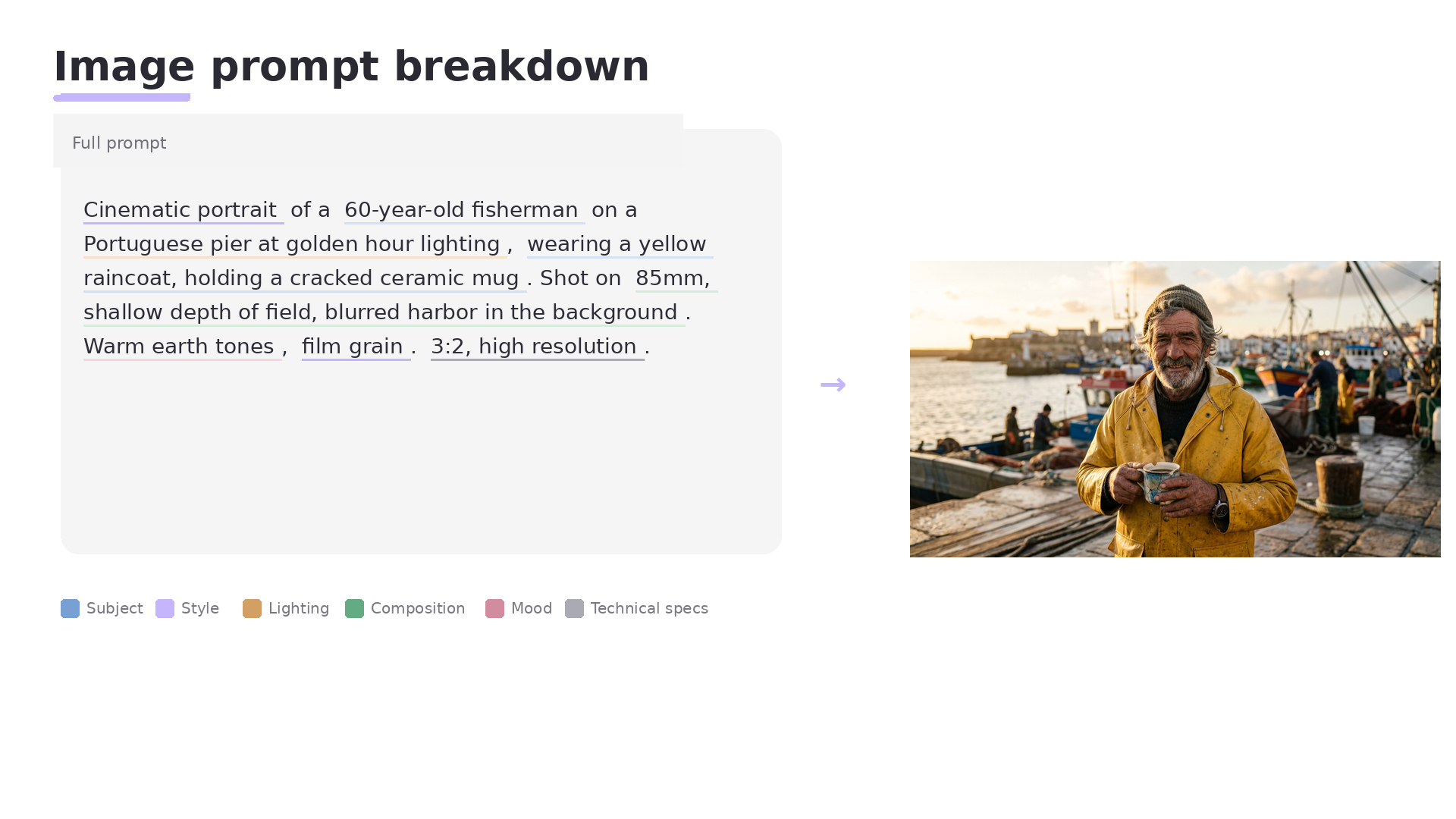
An image prompt is the text description you send to an AI image generator (Midjourney, Nano Banana, Adobe Firefly, gpt-image-1, Stable Diffusion) so it can create images that match what you want to see. A good image prompt names the subject, the style, the lighting, the composition, and the atmosphere, and gives AI models enough specific details to make one clear creative decision instead of guessing.
That last part is the whole game. Vague ai prompts get vague photos. Specific ai prompts get sharper details and images you can use.
How AI image generation works, in plain English
Most AI image generators read your prompt, map it into a latent space, then denoise that noise, step by step, into pixels. You do not need the math. You do need one thing: your image prompt is a creative brief, not a search query. AI image generation treats the prompt as instructions to compose an image, not a lookup for a matching photo.
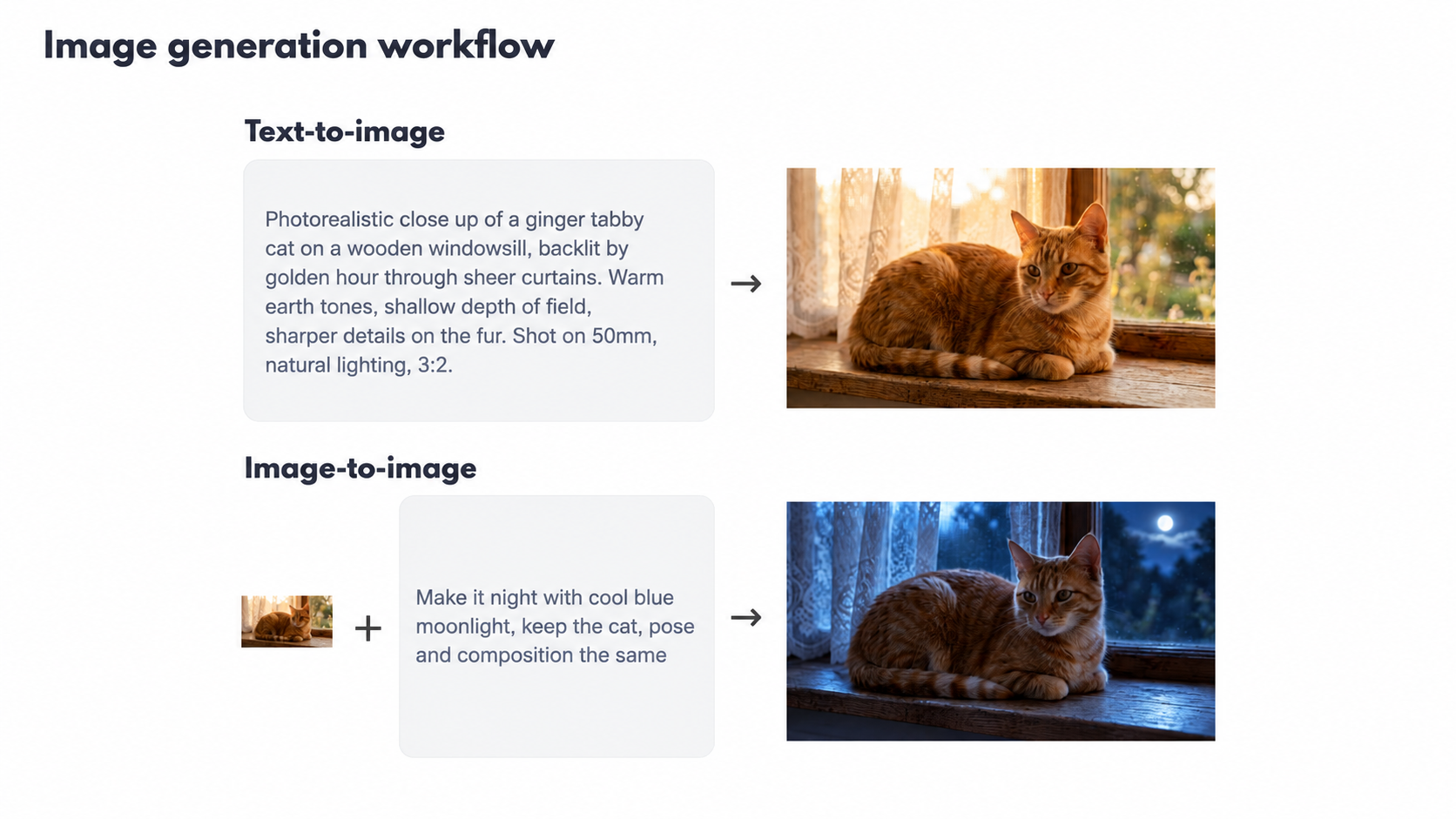
Two workflows sit inside almost every tool.
Text-to-image generation
Pure prompt in, image out. You describe the subject, style, and lighting, and the AI paints the image from scratch. Best for concepts that do not exist as photos yet, like a product mascot or a moodboard for a pitch.
Image-to-image generation
You upload a reference photo plus a prompt. The AI uses your photo as a starting point and reshapes it toward your prompt. Good for editing photos, style transfer, restaging product photos, or keeping character consistency across generated images.
Newer AI image models blur the line. Google’s Nano Banana (its community nickname for Gemini 2.5 Flash Image, released in August 2025) does conversational editing on an uploaded photo without you drawing masks. OpenAI’s gpt-image-1 was added to the OpenAI Images API in April 2025 with the same kind of native text and image input.
The 6-part prompt structure to create images
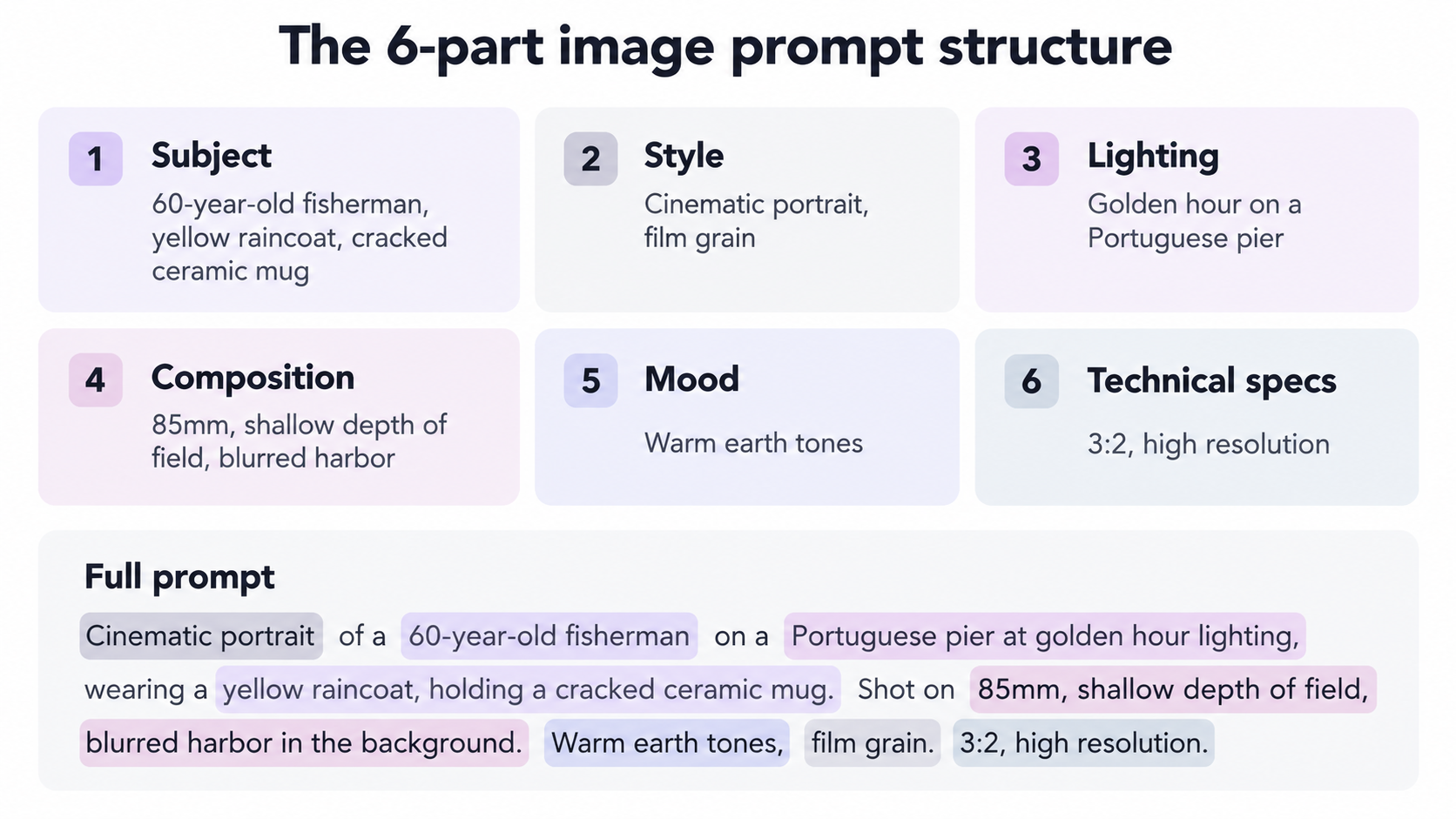
You do not need a prompt generator to write a solid prompt. You need a structure. This 6-part prompt structure works across AI image generators (Midjourney, Nano Banana, Adobe Firefly, Stable Diffusion, gpt-image-1).
1. Subject
Name it. Not “a person.” A 60-year-old fisherman in a yellow raincoat, holding a cracked ceramic mug. The more concrete the subject in your prompt, the fewer weird hands you get.
2. Style
Photograph, oil painting, 3D render, vector illustration, anime cel, pixel art. Pick one visual identity per prompt. Mixing “photorealistic anime watercolor” is how you create mush.
3. Lighting
Describe lighting the way a cinematographer would. Golden hour through a window. Overcast studio lighting. Neon rim light. Muted, low key. Lighting is the single biggest lever for mood.
4. Composition
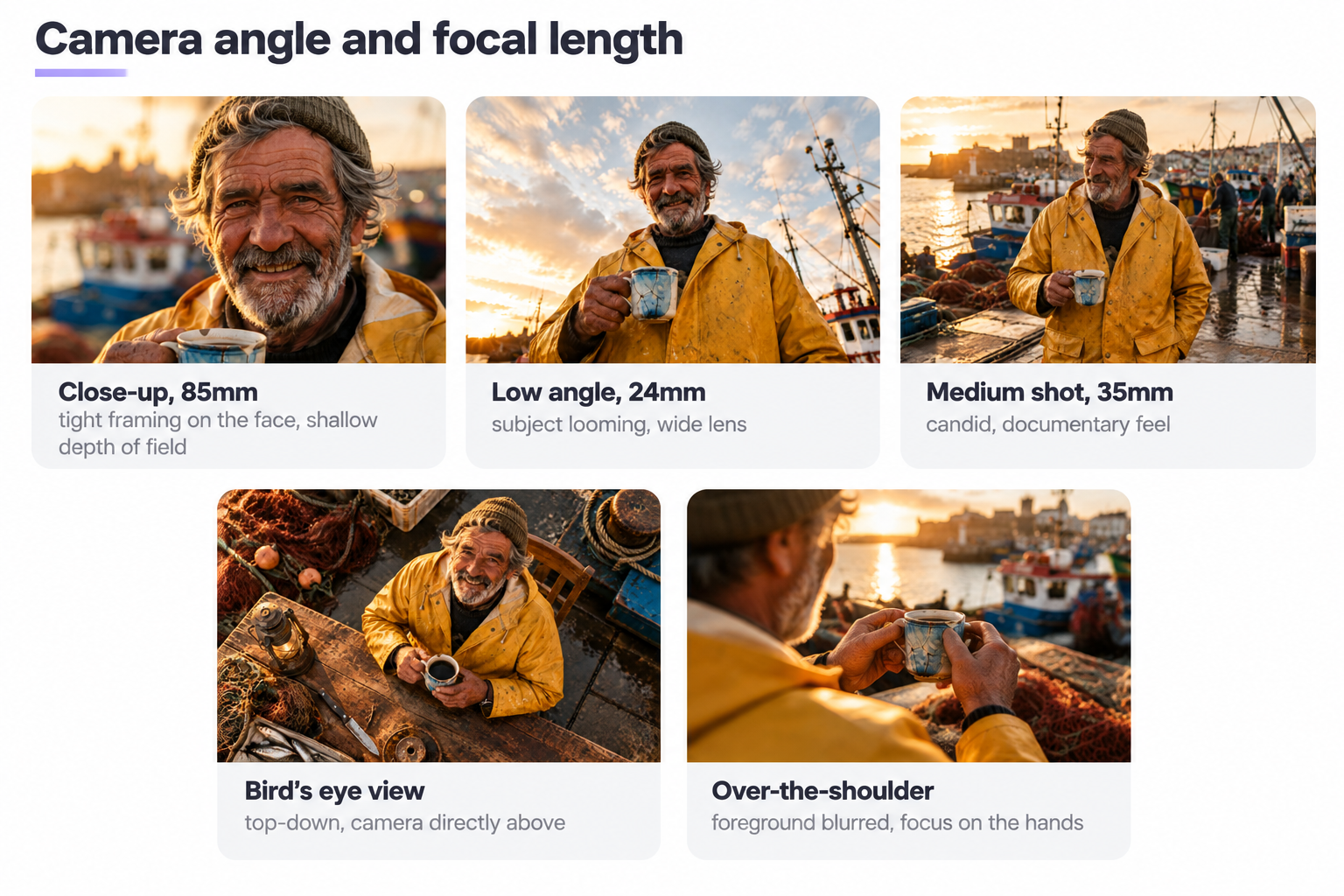
Close up, medium shot, wide, bird’s eye view. Rule-of-thirds framing. Shallow depth of field, subject sharp, blurred background. State the camera angle in the prompt so the AI does not default to a bland eye-level shot.
5. Mood and atmosphere
Melancholic, playful, tense, nostalgic. One word is enough. Two if you must.
6. Technical specs and settings
Aspect ratio (1:1, 16:9, 9:16), resolution hint (high resolution), realistic materials (wood, brushed steel, matte ceramic), any model-specific settings. In Midjourney: –ar and –style flags. In Nano Banana: natural sentences describing what you want changed.
A complete image prompt example
Cinematic portrait of a 60-year-old fisherman on a Portuguese pier at golden hour lighting, wearing a yellow raincoat, holding a cracked ceramic mug. Shot on 85mm, shallow depth of field, blurred harbor in the background. Warm earth tones, film grain. 3:2, high resolution.
Read that back. You can picture the image before the AI touches the prompt. That is the test.
Prompt completeness checklist
Before you generate your first image, run through this:
- Subject named with specific details (age, clothing, object)
- One visual style, not three
- Lighting descriptions (time of day, quality, direction)
- Composition or camera angle stated
- Mood in one word
- Aspect ratio or a technical setting at the end
If four of the six are missing from the prompt, do not blame the tool.
How to write an image prompt: lighting like a cinematographer
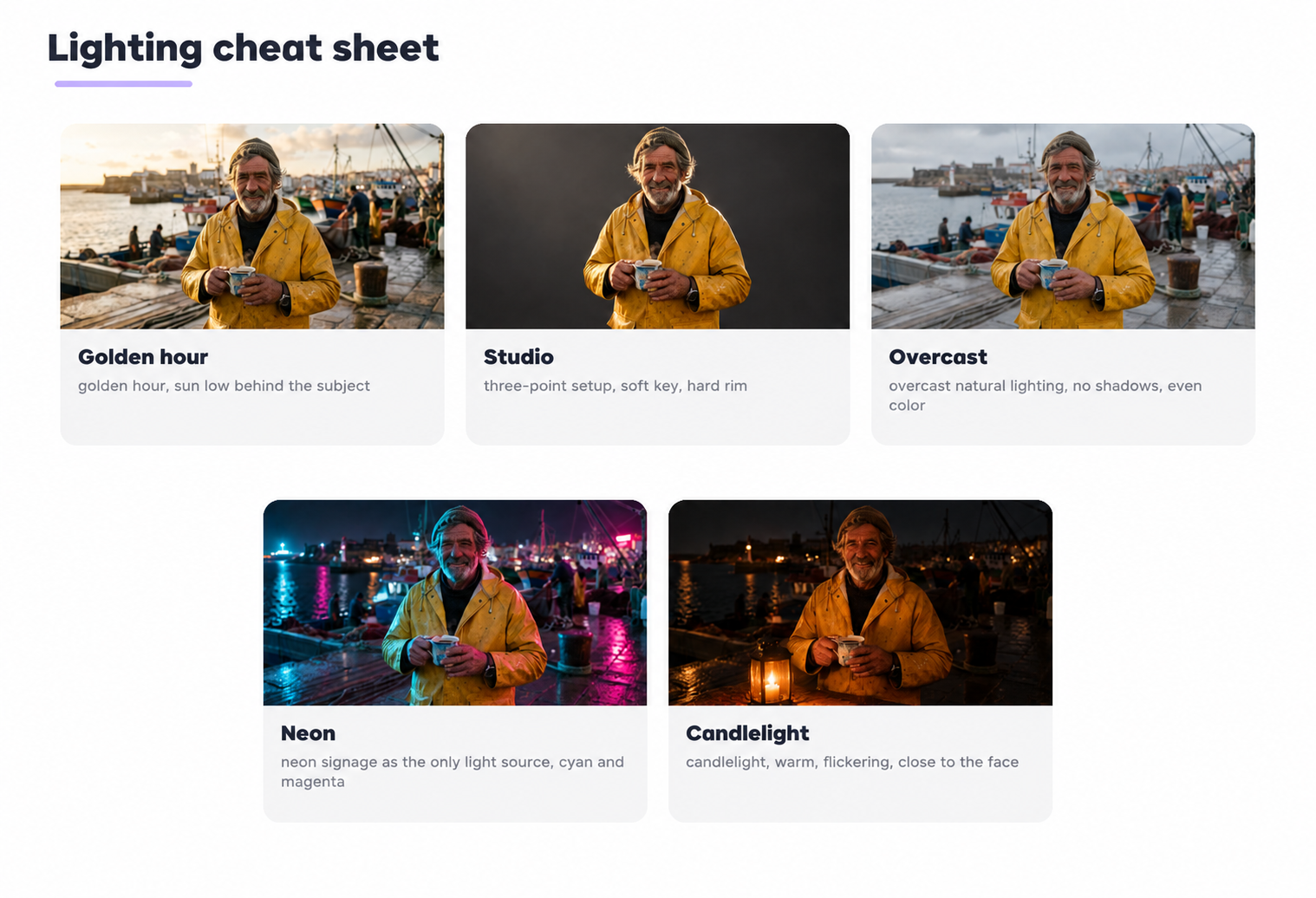
Lighting is where beginner image prompts collapse. “Nice lighting” tells the AI nothing. Try the language a photographer uses to talk about lighting setups.
- Golden hour, sun low behind the subject
- Studio lighting, three-point setup, soft key, hard rim
- Overcast natural lighting, no shadows, even color
- Neon signage as the only light source, cyan and magenta
- Candlelight, warm, flickering, close to the face
Same subject in the prompt, at golden hour and under studio lighting, reads as two different photos. That is the point.
Camera angle, framing, and the shots that carry weight
State the shot in your prompt. Skip it and the AI defaults to a bland eye-level frame. For example:
- 85mm, tight framing on the face, shallow depth of field
- Bird’s eye view of a wooden desk covered in tools, top-down
- Low angle, subject looming, wide 24mm lens
- Over-the-shoulder shot, foreground blurred, focus on the hands
Rule of thirds is worth naming. So is focal length (35mm feels documentary, 85mm feels portrait, 24mm feels architectural).
Writing prompts for different visual styles
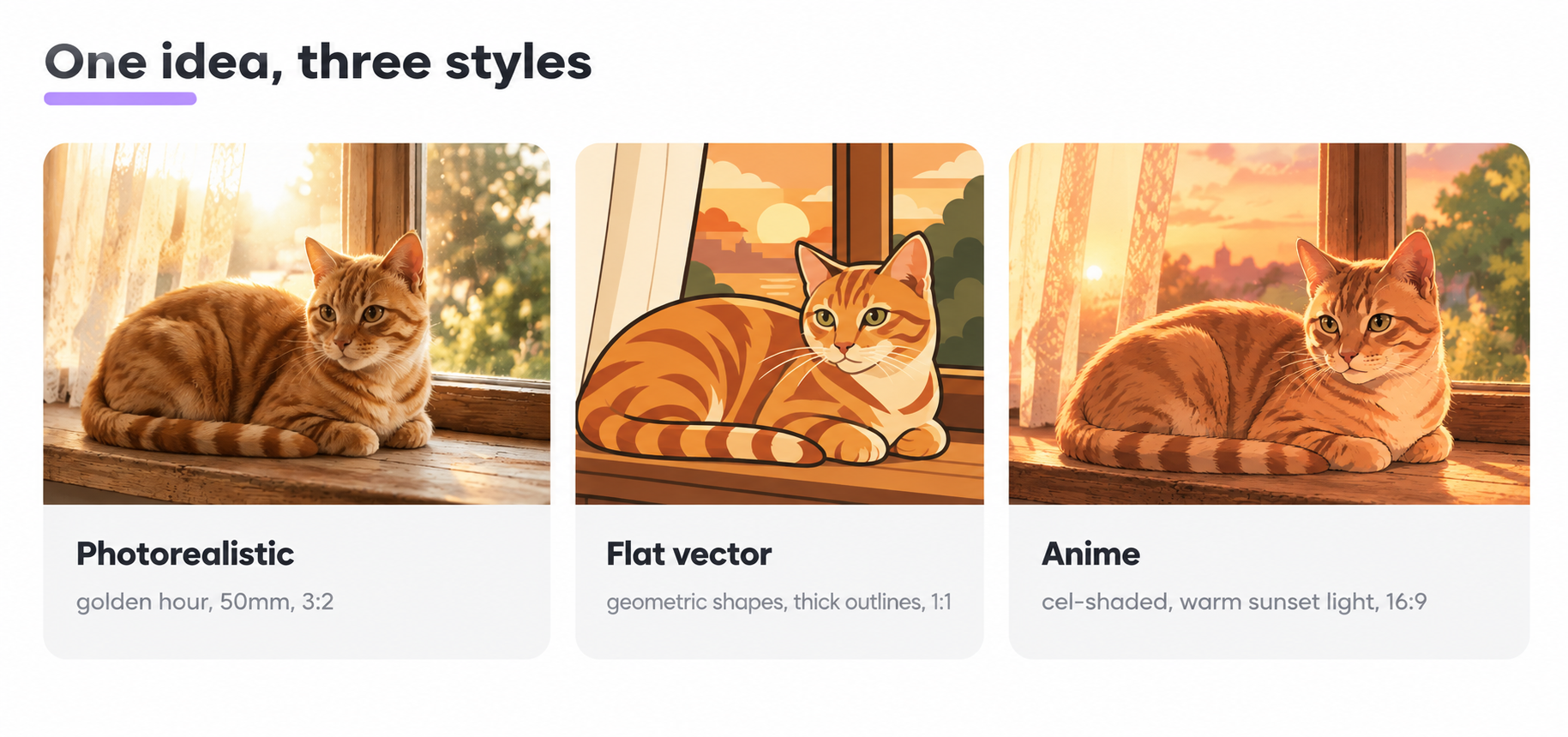
Same idea, three prompts, three worlds. Here is how one idea (a cat on a windowsill at sunset) shifts by style.
Photorealistic prompt template
Photorealistic close up of a ginger tabby cat on a wooden windowsill, backlit by golden hour through sheer curtains. Warm earth tones, shallow depth of field, sharper details on the fur. Shot on 50mm, natural lighting, 3:2.
Illustration prompt template
Flat vector illustration of a ginger cat on a windowsill at sunset. Geometric shapes, warm palette (rust, amber, cream), thick outlines, no gradients, editorial style. 1:1, soft shapes in the background.
Anime prompt template
Anime cel-shaded illustration of a ginger cat curled on a windowsill, Studio Ghibli vibe, warm sunset light from the left, dust motes in the air, hand-painted background, 16:9.
The idea barely changes. Style, lighting descriptions, and composition do all the work in each prompt.
Photorealistic prompt examples you can steal
These prompt examples are paste-ready. Swap the details for yours. Each example works across most tools.
Professional headshot example:
Professional headshot of a 35-year-old woman with dark curly hair, navy blazer, neutral gray studio background, soft key light from camera left, subtle rim light. Sharp eyes, natural skin texture, 85mm, 4:5.
Product photography example for e commerce:
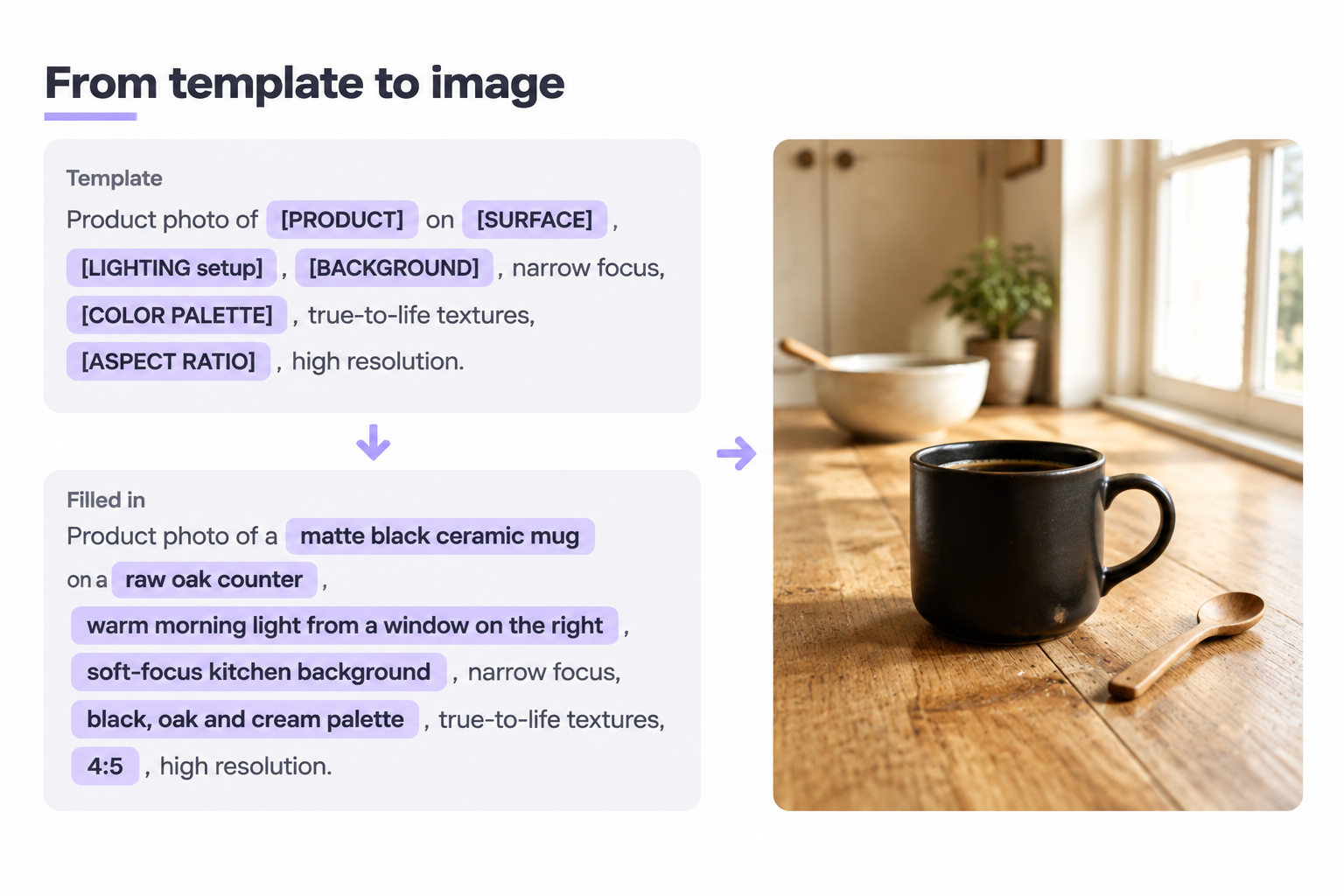
Product photo of a matte black ceramic mug on a raw oak counter, warm morning light from a window on the right, soft-focus kitchen background. Realistic materials, high resolution, square. Editorial e commerce vibe.
Documentary example:
Candid documentary photo of a street vendor grilling corn at night in Bangkok, neon signs reflected on wet asphalt, motion in the crowd, shot on 35mm, high ISO grain, 3:2.
Cinematic prompt examples
Cinematic 1 (sci-fi):
Wide cinematic shot of a lone astronaut on a Martian dune at sunset, orange dust in the air, cracked helmet visor reflecting the sun, low angle, teal and orange color grade, 2.39:1.
Cinematic 2 (city):
Tokyo alley in the rain, one figure under a red umbrella walking away from camera, warm shop signs, cool blue rain, focus on the umbrella, 16:9.
Illustration, anime, and pixel art prompt examples
Vector illustration example:
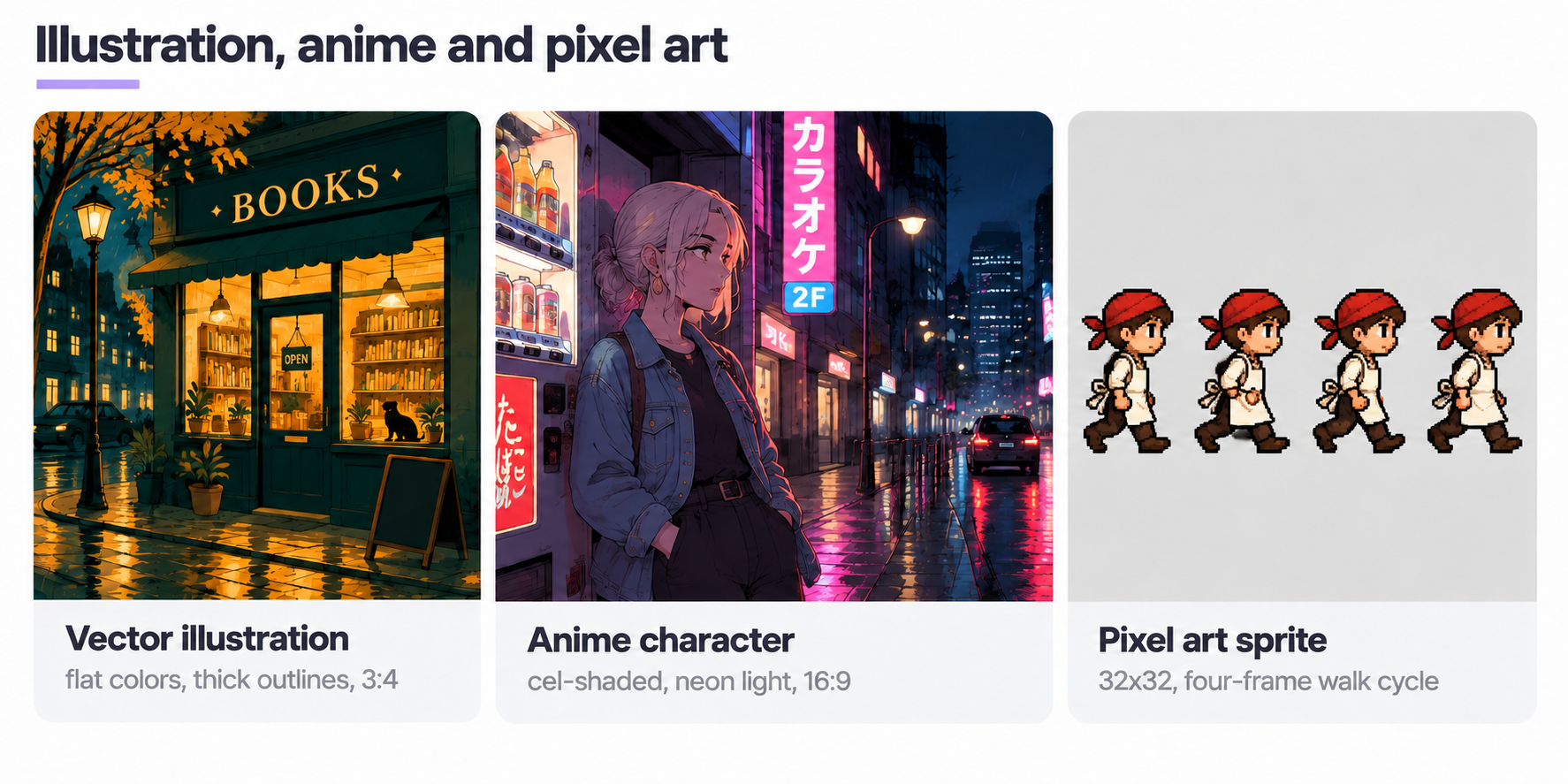
Flat vector illustration of a small bookstore at night, warm yellow interior light spilling onto a rainy street. Minimal palette (teal, mustard, cream), thick outlines, editorial poster style, 3:4.
Anime character pose example:
Anime illustration of a young woman with silver hair leaning against a Tokyo vending machine at 2 a.m., soft neon light on her face, oversized denim jacket, hands in pockets, looking off-frame. Cel-shaded, 16:9.
Pixel art sprite example:
32×32 pixel art sprite of a walking chef character, side view, white apron, red bandana, four-frame walk cycle on a transparent background, retro RPG aesthetic.
If your AI image generator supports parameters, add them at the end of the prompt. Midjourney: –ar 16:9 –style raw. Nano Banana and gpt-image-1: keep it in natural sentences. Both AI models respond better to full descriptions than to keyword soup.
Editing photos and image-to-image workflows
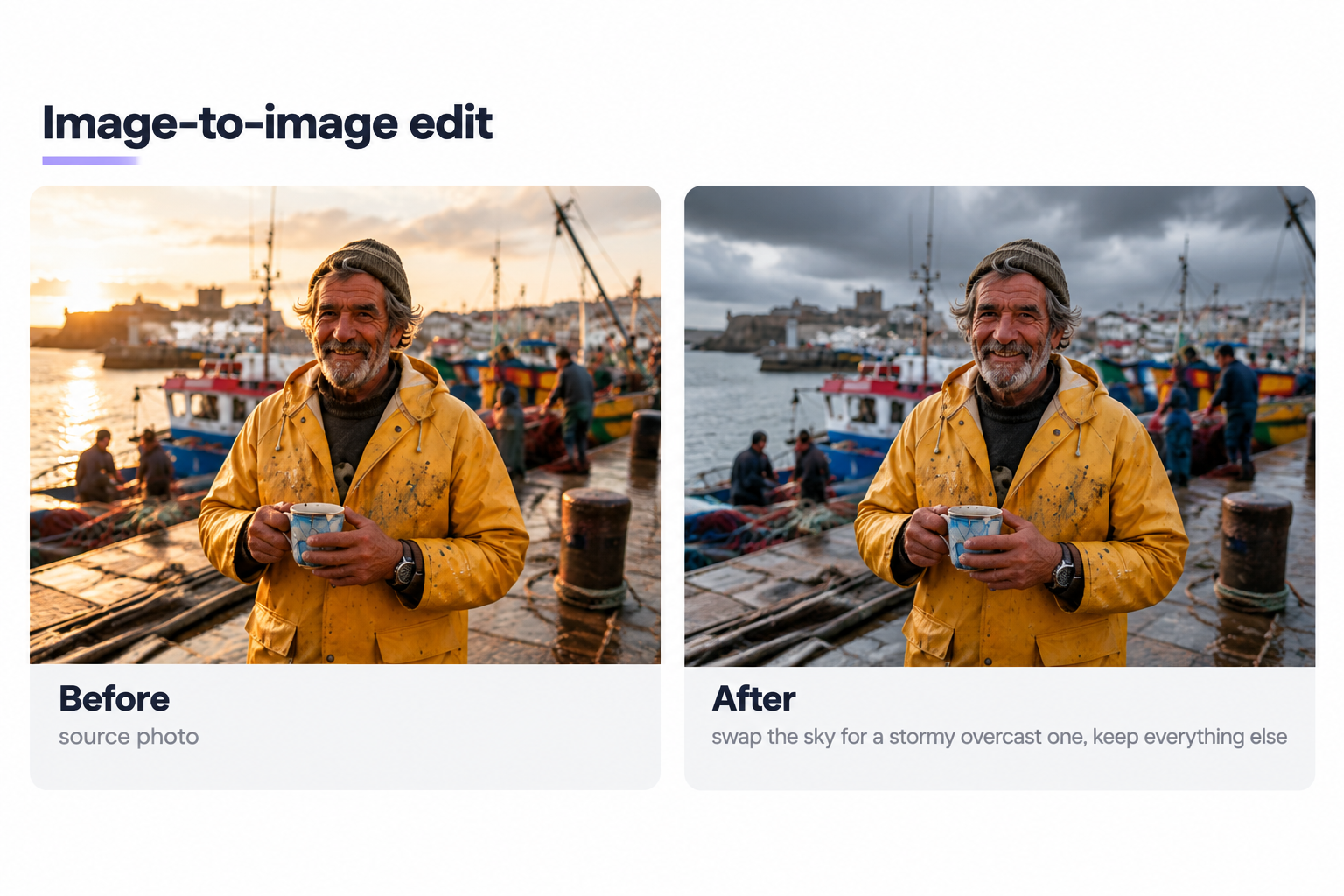
You already have a photo. You want to change one thing. This is where image-to-image generation and an image to prompt generator earn their keep.
How to convert a photo into a prompt
Reverse the creative process. Look at the photo you want to match and describe it as if you were briefing a photographer. Subject, wardrobe, lighting, framing, background. That description becomes your image prompt. An image to prompt generator does this for you: simply upload the reference photo, and the image to prompt generator produces a text prompt you can feed back into any AI image generator.
Reference images for character consistency
When you need the same face across a series (same character, five poses), simply upload reference images with each prompt. Nano Banana was built for this and maintains character identity across edits in ways older AI image models struggled with.
Step-by-step image-to-image edits
- Upload the source photo.
- Write a prompt describing only what should change. For example: “swap the sky for a stormy overcast one, keep everything else.”
- Generate, compare, iterate.
- If a change breaks something else, tighten the prompt: “keep the person’s face and clothing unchanged.”
Simply upload, describe, adjust. Repeat until the generated images hold together.
Reusable prompt templates for creative work
Save these prompt examples as starting points and swap the variables. Adapt each template to your own brand assets and visual identity.
Product photography template:
Product photo of [PRODUCT] on [SURFACE], [LIGHTING setup], [BACKGROUND], narrow focus, [COLOR PALETTE], true-to-life textures, [ASPECT RATIO], high resolution.
Social content template:
[STYLE] image of [SUBJECT], [ATMOSPHERE], [LIGHTING], [FRAMING], palette pulled from brand colors, 9:16 for Reels, 1:1 for feed.
Portrait editing template:
Portrait of [PERSON], [WARDROBE], shot on [FOCAL LENGTH], [LIGHTING], [COLOR GRADE], [ASPECT RATIO].
E commerce hero template:
Editorial e commerce photo of [PRODUCT] used by [PERSONA], [LOCATION], [LIGHTING], candid pose, [ASPECT RATIO].
Adapt each template per brand. Lock your color palette, framing preference, and lighting vocabulary. That is what turns generated images into recognizable content instead of stock-looking noise.
Tools, free image resources, and top AI image generators
You will run into the same handful of AI image generators. Here is when each one earns its keep in creative workflows.
- Nano Banana (Gemini 2.5 Flash Image). Google’s conversational editor. Trained for multi-image fusion and consistent characters, with SynthID watermarking on every output. Best for edits driven by natural language.
- gpt-image-1 (OpenAI). Strong at text inside images (posters, labels, mockups). Available through ChatGPT and the OpenAI API.
- Midjourney. Prompt-driven, style-heavy. Best for stylized art direction.
- Adobe Firefly. Trained on Adobe Stock and public-domain content, so Adobe Firefly positions its outputs as commercially safer. Integrated into Photoshop and Illustrator.
- Stable Diffusion and FLUX. Open weights. Best for running locally, fine-tuning, or plugging into your own pipeline.
For free image resources (stock, not generated), Unsplash, Pexels, and Openverse cover most social content needs. Wikimedia Commons handles public-domain historical assets.
Model selection is simple. Photorealism at scale: gpt-image-1 or Midjourney. Editing an existing photo conversationally: Nano Banana. Brand-safe images with legal cover: Adobe Firefly. Full control and self-hosting: Stable Diffusion. Match the tool to your specific needs.
If you want one place that bundles AI image generation, an image to prompt generator, and a prompt generator for text prompts, open the Eliten image workspace and start creating there. It packages the six tools most creative teams juggle (image to prompt generator, prompt generator, upscaler, background remover, editor, batch generator) into one AI workspace so you can create images end to end.
Testing, iteration, and tips for better results
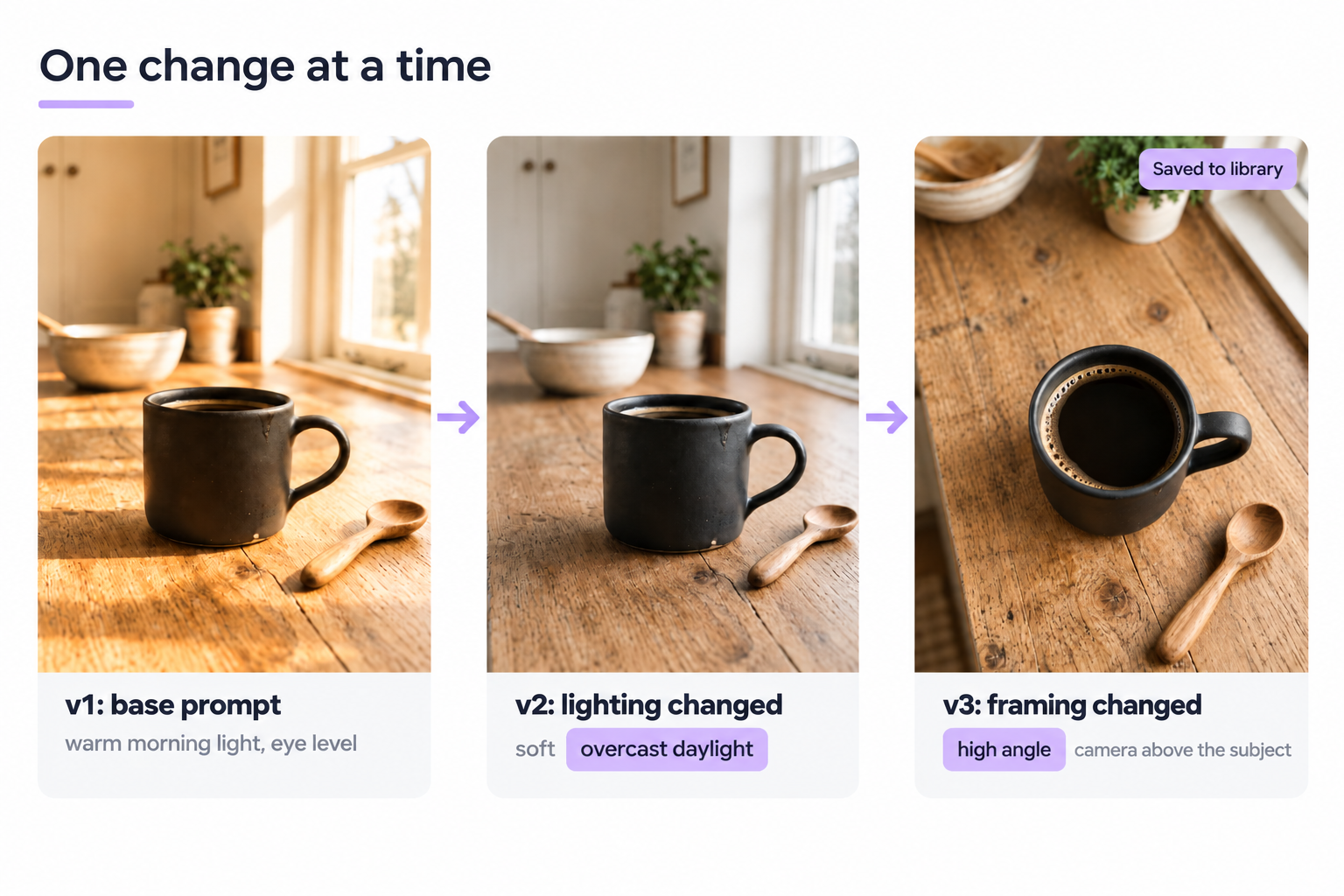
Small changes to the prompt, one at a time. That is the whole method.
- Run three variations of the same prompt with only the lighting changed. Compare.
- Change only the framing next. Compare again.
- Save the prompt version that worked. Add it to your personal prompt library.
- Document what you tried and dropped. The ugly ones save you next time.
Do not rewrite the whole prompt when one word was wrong. AI prompts are edited, not rebuilt. If a tool has a “negative prompt” field (Stable Diffusion, some Midjourney workflows), use it. Naming what you do not want (“no extra fingers, no text artifacts”) cleans up a surprising amount of noise in the generated images. Users who iterate get consistent creative results. Users who regenerate blindly burn credits.
A quick tool-agnostic test loop: pick one image prompt, pick two AI models, generate prompt variations, compare, and keep the winning prompt. Ten minutes of that beats an hour of guessing. Any AI image tool with a batch feature lets you generate prompt sets side by side, which is how creative teams settle debates about which prompt to ship. Test, create a new variant, and repeat until you can create the image on the first shot every time.
Ethics, rights, and safety for generated images
The unglamorous part. Skipping it gets people sued.
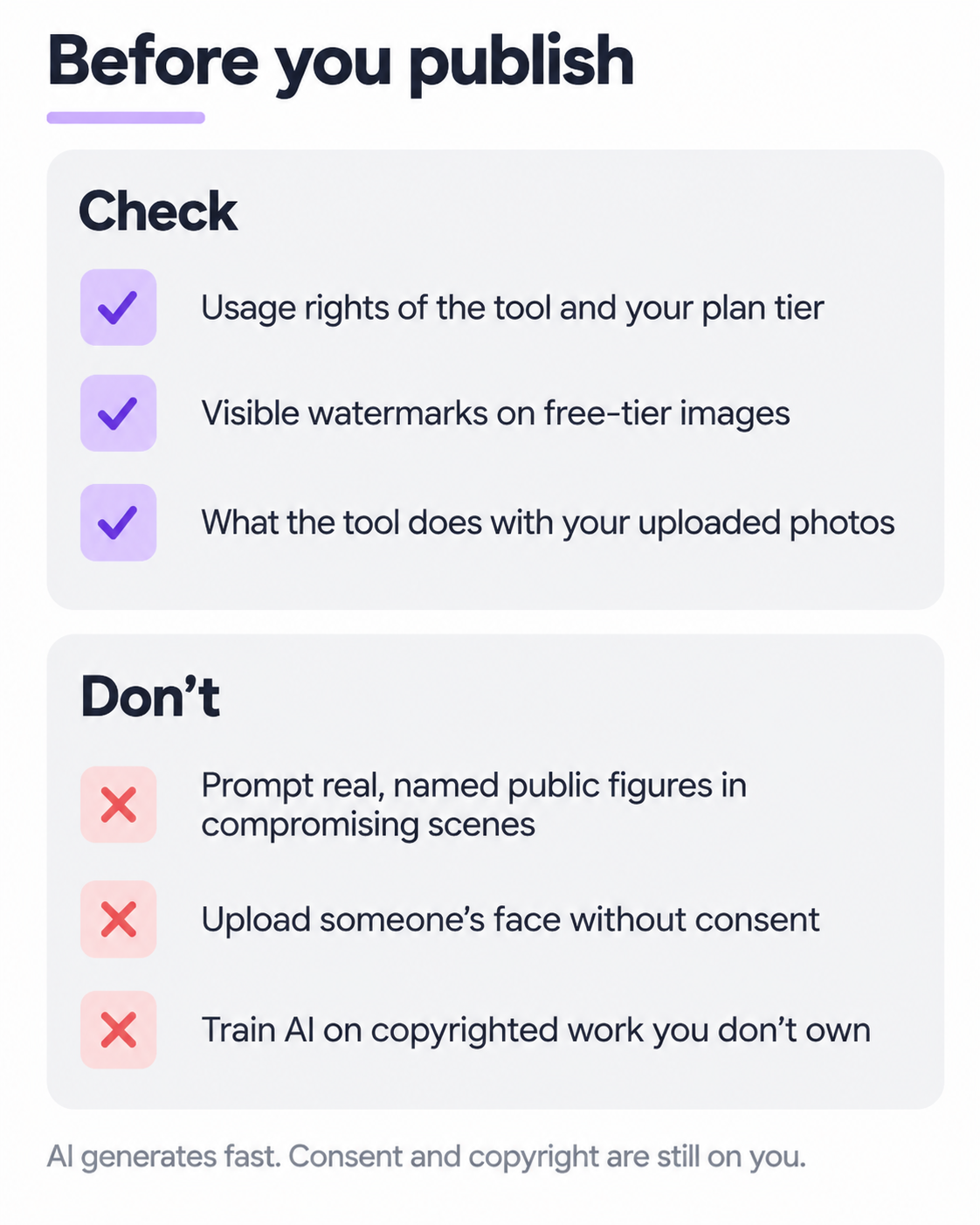
Check the usage rights of whatever tool you used. Midjourney, gpt-image-1, and Nano Banana grant broad commercial use on paid tiers, with caveats. Adobe Firefly leans into commercial safety by training on licensed and public-domain content. Free-tier photos sometimes carry visible watermarks.
Do not prompt for real, named public figures in compromising scenes. Do not upload someone’s face without consent. Do not train an AI on copyrighted work you do not own.
Google’s Nano Banana outputs carry an invisible SynthID watermark that flags them as AI-made. Assume most major AI image models are moving the same way. Data security matters too: check what a tool does with uploaded photos before you feed it client work.
The honest limit: AI can generate images fast and understands consent and copyright slowly. That part is still on you.
Reverse-engineering photos into prompts with an image to prompt generator
Sometimes you see a photo you love and want to create something in that direction. Reverse-engineering the image is the move.
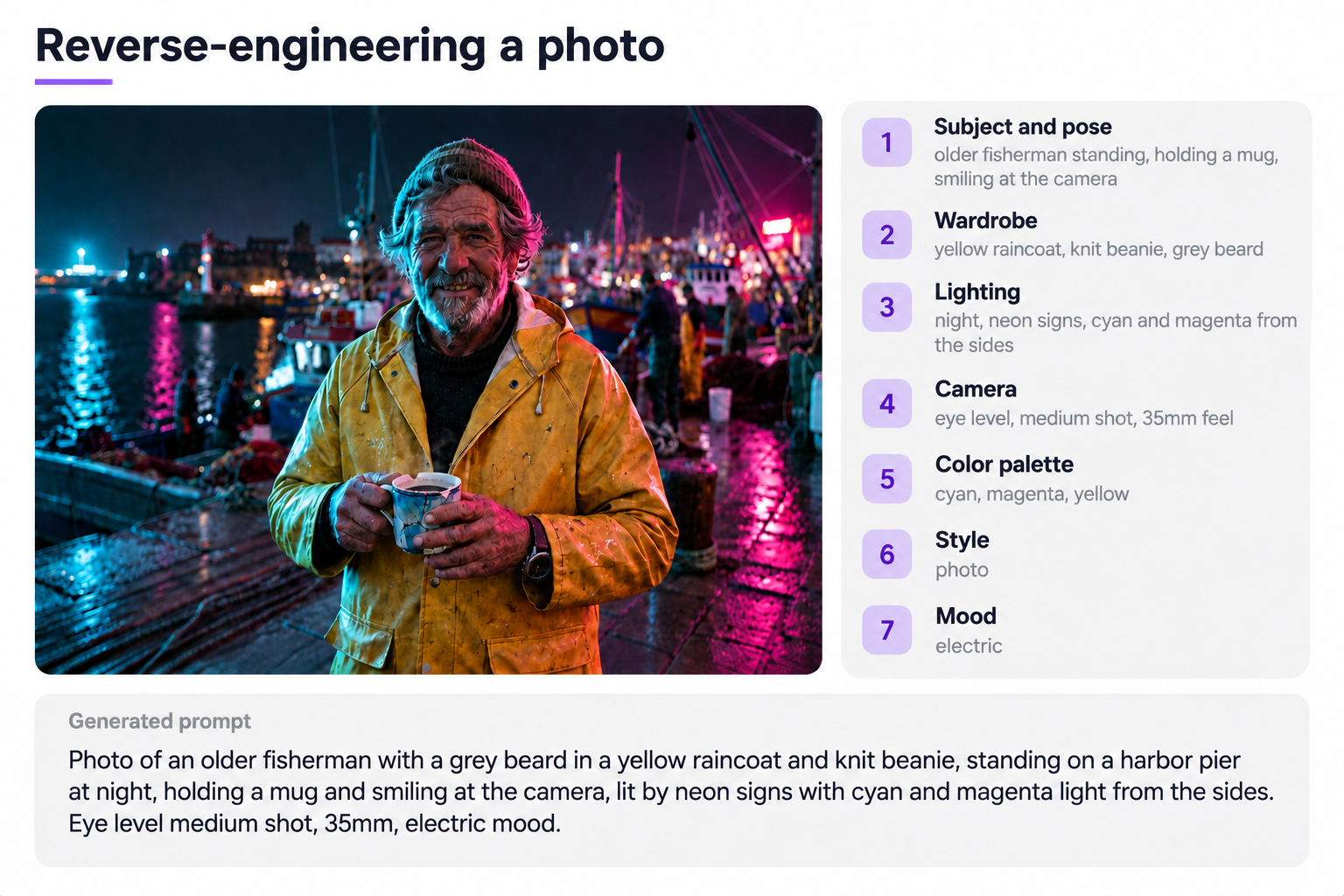
Look at the photo and extract these details, in this order:
- Subject and pose
- Wardrobe or physical details
- Lighting (direction, quality, time of day)
- Camera angle and focal length feel
- Color palette (three dominant colors)
- Style (photo, illustration, render, painting)
- Mood in one word
Write those into a natural-sentence prompt. That is your generate prompt. Feed it into your AI image generator and iterate.
An image to prompt generator does the same thing in seconds. You upload an image, the image to prompt generator reads composition and style details, and it produces highly accurate descriptions that map back to what you can create. Doing it by hand a few times teaches you the vocabulary faster than any tutorial. An image to prompt generator is fast; a photographer’s eye is durable. Use both.
Prompt library and example pack: adapt prompt examples per AI model
Ready-made prompt examples are starting points, not finished briefs. Copying a prompt from a library and running it in a different tool rarely reproduces the source image. Different AI image generators weight different words. Same prompt, five AI models, five sets of photos.
Adapt each prompt example to your model. Midjourney rewards short, dense phrases and parameter flags. Nano Banana and gpt-image-1 reward full sentences. Stable Diffusion custom checkpoints often need specific trigger words baked in by the model author.
The move: use each library prompt as the skeleton, then rewrite the syntax for your target AI model. Users who skip this step wonder why the generated images they create look nothing like the reference. Users who do it get on-brand photos and a repeatable creative process.
FAQ
A prompt for an image is the text description you give an AI image generator so it knows what to create. A useful prompt names the subject, the style, the lighting, the composition, and the mood, and lands somewhere between one sentence and a short paragraph. If you upload a reference photo alongside the prompt, that also counts.
Good image prompts are specific, single-style, and written like a creative brief. They name the subject with a concrete detail, talk about lighting like a photographer would, state the framing, add a mood word, and end with a technical spec such as aspect ratio. Vague ai prompts get vague generated images. Specific ai prompts get sharper details and photos you can ship.
Image prompt means the input text (and sometimes an uploaded reference photo) that instructs an AI image generator on what to produce. The term covers both short one-liners for Nano Banana and long, structured briefs common in Midjourney. Each style of prompt has its place.
Write an image prompt in six parts: subject, style, lighting, composition, mood, technical specs. Start with the subject, state the lighting precisely, name the framing, add a mood word, and finish with aspect ratio or resolution notes. Test small changes to the prompt. Save the versions that generate images you like. Feed the winners back into your prompt generator library.
Sometimes yes, sometimes no. Freemium AI image generation (Nano Banana in the free Gemini app, Adobe Firefly’s free credits, Stable Diffusion running locally) can produce excellent generated images. AI photo prompts you find in free packs across the web are a legitimate starting point, though many are written for one specific model and do not port cleanly. Paid tiers give you higher resolution, faster generation, fewer watermarks. Start completely free to learn what your prompt structure needs. Upgrade when you hit a real limit.
An image to prompt generator takes a photo you upload and reverse-engineers it into a text prompt you can send to any AI image generator. The image to prompt generator analyzes the image content, extracts subject, style, and lighting details, and writes them as a natural-language prompt. Useful when you want to match a reference or generate prompt variations quickly. Most AI models now bundle an image to prompt generator in the same creative workspace, so you can upload, generate prompt candidates, edit, and create images without switching tools.
Master the prompt structure first. The tool comes second. Learn to create the shot on paper. Then let the AI create the pixels.
Sources
- Google, “Nano Banana is coming to Google Search, NotebookLM and Photos”: https://blog.google/technology/ai/nano-banana-google-products/ (official confirmation of Gemini 2.5 Flash Image / Nano Banana naming, launch timing, and scope).
- Google Developers Blog, “Introducing Gemini 2.5 Flash Image”: https://developers.googleblog.com/en/introducing-gemini-2-5-flash-image/ (technical overview of multi-image fusion, character consistency, editing capabilities).
- Google, updated image editing model announcement: https://blog.google/products/gemini/updated-image-editing-model/ (character identity preservation and editing behavior).
- OpenAI, “Introducing our latest image generation model in the API”: https://openai.com/index/image-generation-api/ (release of gpt-image-1 in the OpenAI Images API, April 2025).
- Adobe Firefly product page: https://www.adobe.com/products/firefly.html (Adobe’s stated training data and commercial-use positioning).
- Google DeepMind, SynthID: https://deepmind.google/technologies/synthid/ (invisible watermarking applied to Nano Banana outputs).