
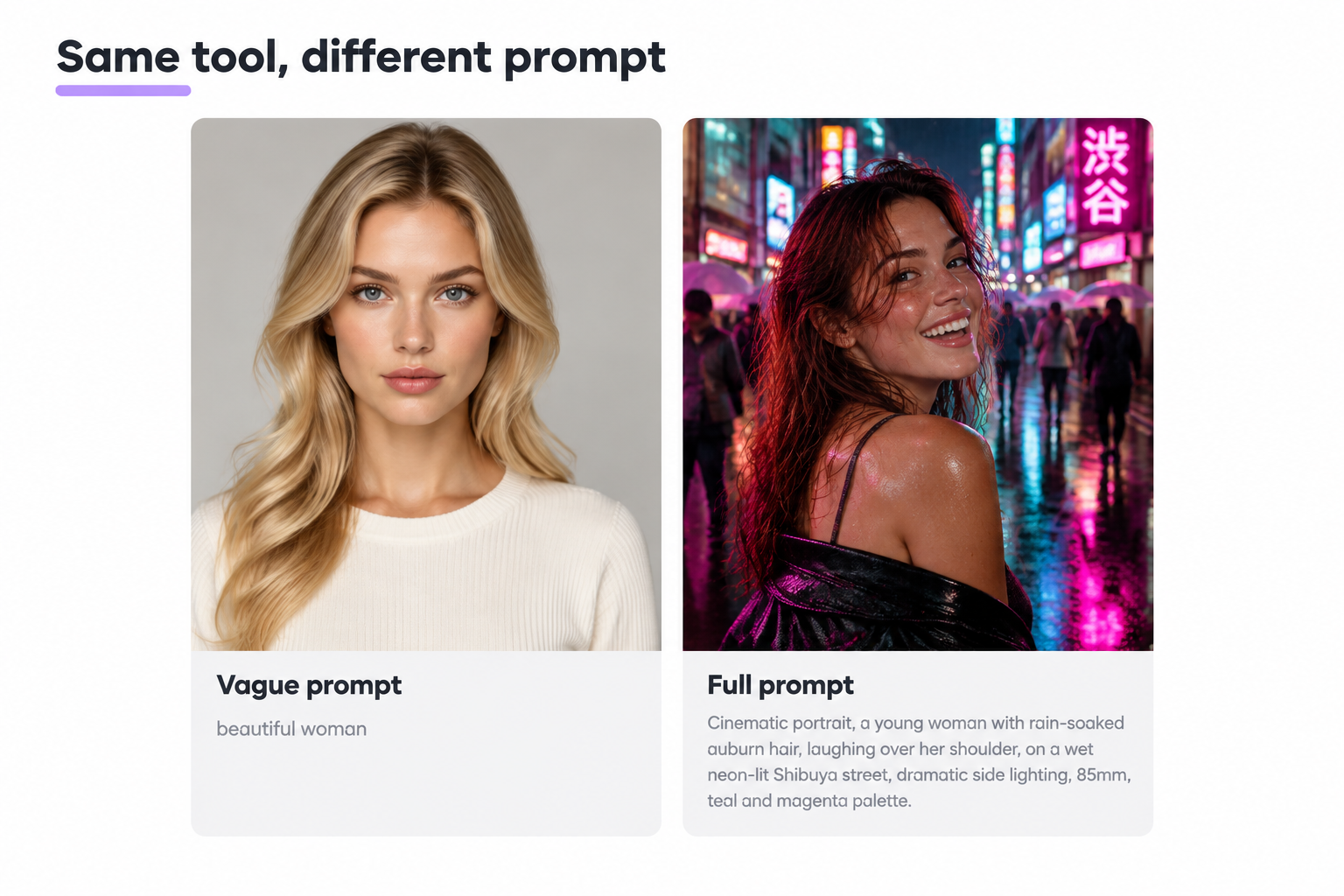
You opened an ai image tool, typed “beautiful woman”, got something dead-eyed and plastic, and closed the tab.
Sound familiar? The tool was not the problem. The prompt was.
Good ai images prompts separate dead-eyed output from images you would use.
This is a working library of ai images prompts, not theory. Over 100 copy-paste ai photo prompts and image prompts across cinematic shots, photorealism, product, illustration, anime, pixel art, brand, logos, and edits to your own photo.
You also get a reusable formula for writing your own ai image prompts from scratch, plus habits that separate ai images prompts work from photo prompts that generate images looking like plastic.
Grab whichever ai images prompts match what you need. Swap one variable. Ship it.
What are AI images prompts?
AI images prompts are the text instructions you feed an ai image generator, describing subject, setting, style, and lighting so the model can generate images that match the picture in your head.
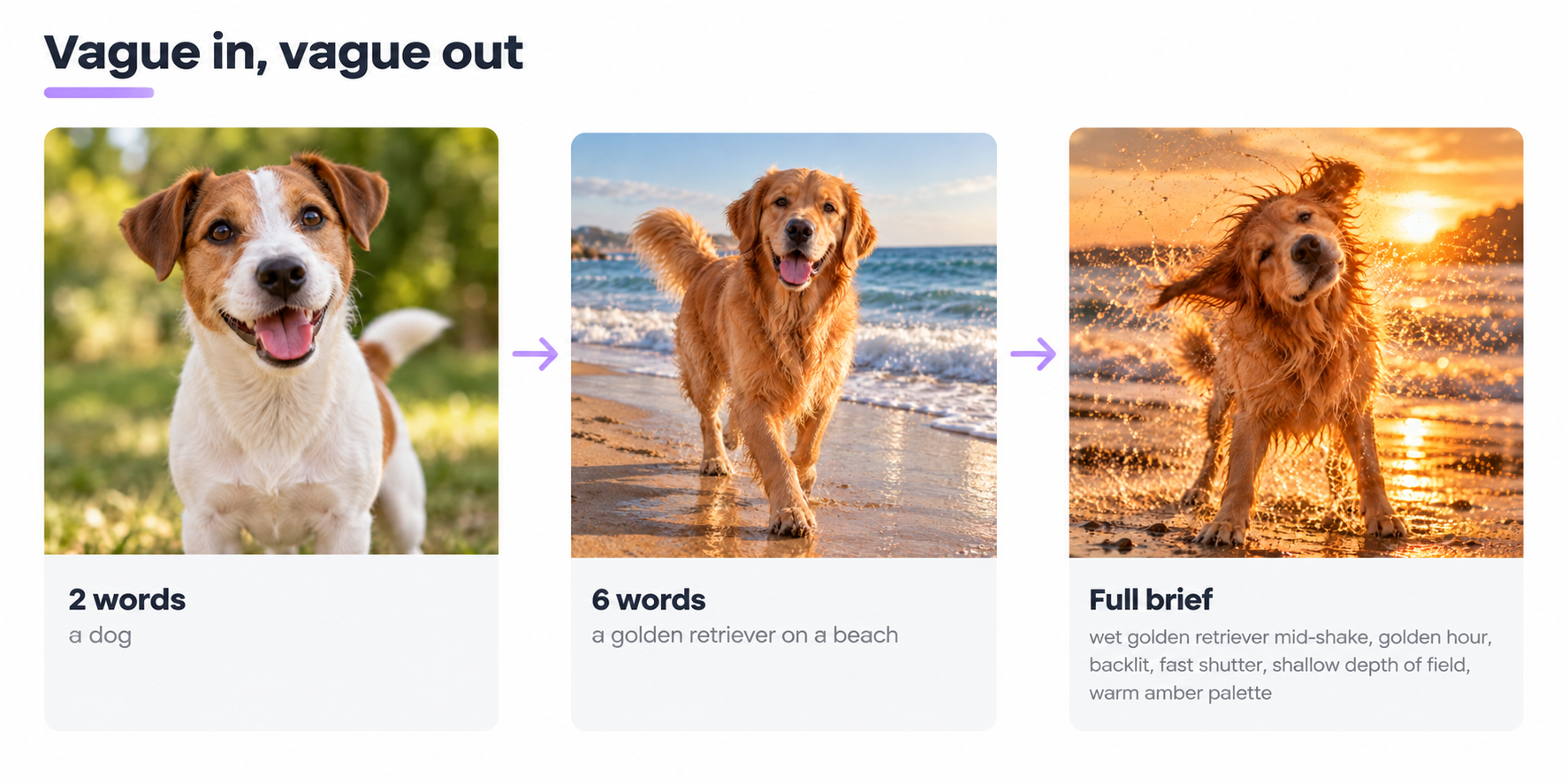
The clearer and more specific your ai images prompts, the closer the ai generated images land to what you wanted. Vague in, vague out.
Think of a prompt as a creative brief for a very fast, very literal freelancer who has never met you.
How AI image generation actually works
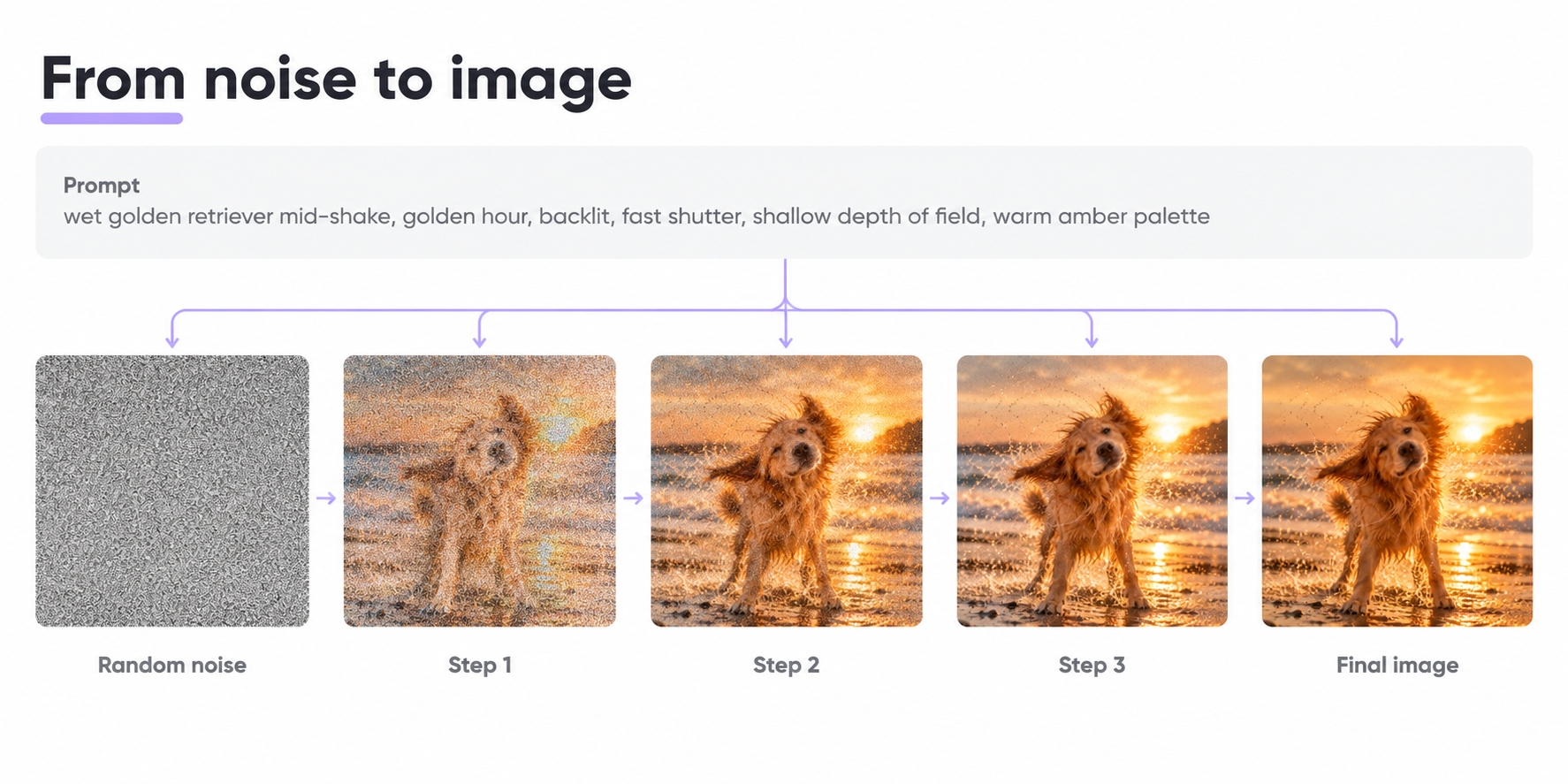
Every modern ai image generator, whether Midjourney, DALL·E, Stable Diffusion, or Flux, runs on the same core idea. A diffusion model starts with random noise and denoises it step by step, guided by your prompt, until an image emerges.
Specificity is one of the key elements. The model does not know you meant “shot on 35mm at golden hour”. It knows what you typed. Two words leave it free to guess. Twenty well-chosen words, with concrete lighting details and camera notes, give it a map.
Key elements: subject, action, setting, style, and light.
Midjourney’s own prompt basics guide puts it bluntly: short, precise phrases beat long messy instructions.
OpenAI’s image generation docs allow long prompts (up to 4,000 characters), but useful is not the same as long. A tight 40-word prompt beats a bloated 400-word one.
Where photo prompts fit into ai image generation workflows
Most people combine three approaches to generate images at work:
- Text-only ai photo prompts, from scratch.
- Reference photo prompts, where you upload your own photo and ask for a restyle or edit.
- Fast iteration on a single prompt, changing one detail and regenerating rather than starting over.
You will use all three. This library covers all three.
How AI image prompts work: the four building blocks
Every ai images prompts that work well share the same four blocks. Nail them and everything else is polish.
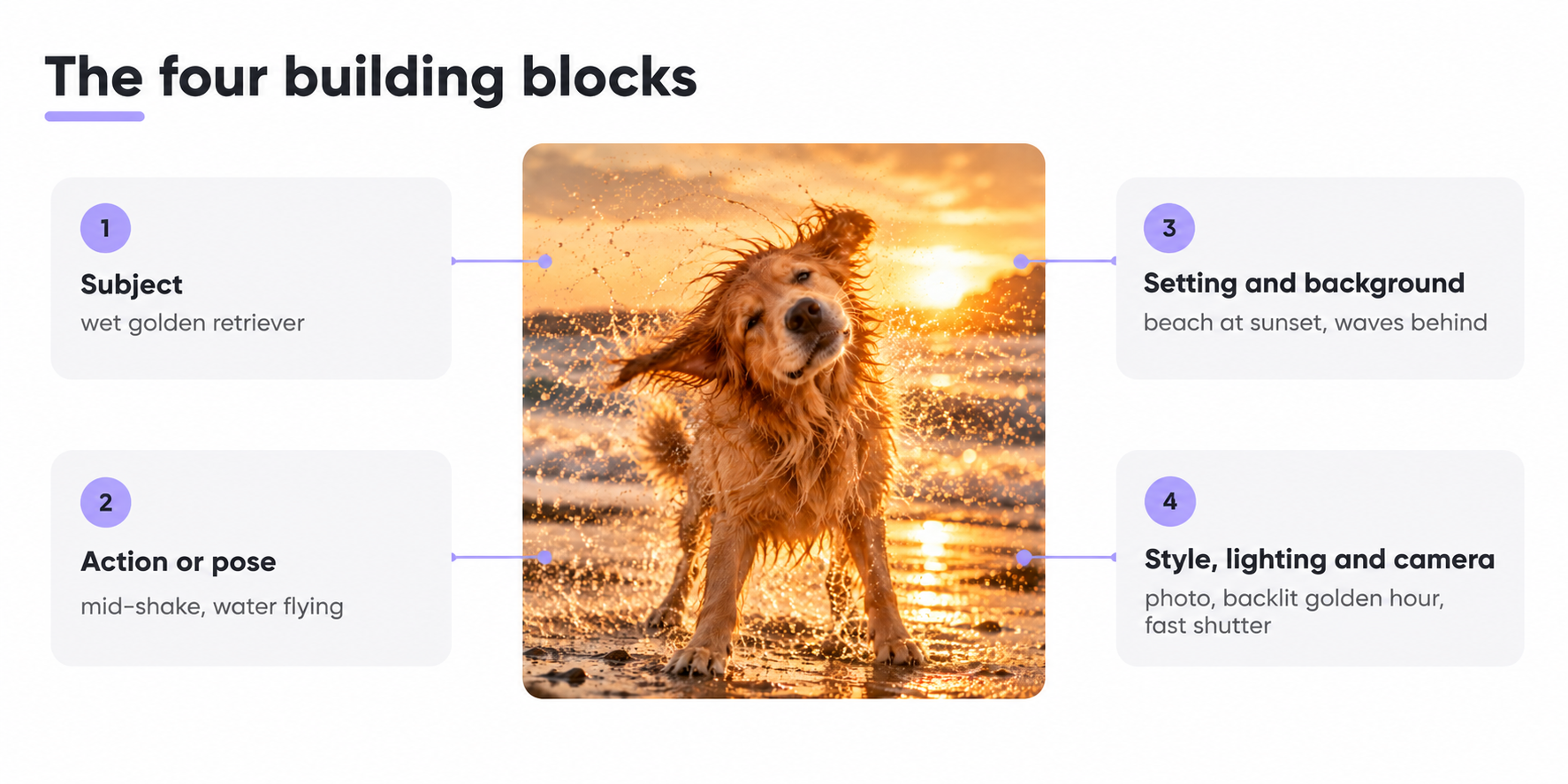
Subject
Who or what is in the frame. Not “a person”. A “young woman with cropped silver hair and freckles”. Not “a dog”. A “wet golden retriever mid-shake”. Specific details cut the guesswork.
Action or pose
What the subject is doing, right now. “Reading”, “laughing mid-sip”, “sprinting off a starting block”, “pouring milk into a coffee cup”. A verb pins the moment down.
Setting and background
Where this is happening. A cozy living room at dusk. A rain-soaked Tokyo street. A studio with a plain grey backdrop. Leave this blank and the model invents a background you did not ask for.
Style, lighting, and camera
The visual language. Watercolor illustration, cinematic portrait, product photo, pixel art. Studio lighting, soft lighting, golden hour lighting, dramatic side light. Camera choices like a wide angle view, overhead flat lay, or tight portrait crop.
Miss one of these and you leave the model guessing. Nail all four and results tighten sharply.
The reusable prompt formula
Steal this. Fill in the blanks. It works for most ai image generation jobs.
[Style], [subject with specific details], [action], [setting], [lighting], [camera or composition], [color palette].
Worked example:
Cinematic portrait, a young woman with rain-soaked auburn hair, laughing over her shoulder, on a wet neon-lit Shibuya street, dramatic side lighting from a shop sign, shallow depth of field, 85mm lens, teal and magenta palette.
Change the style token at the front and you get completely different ai image results with the same subject, action, and color palette.
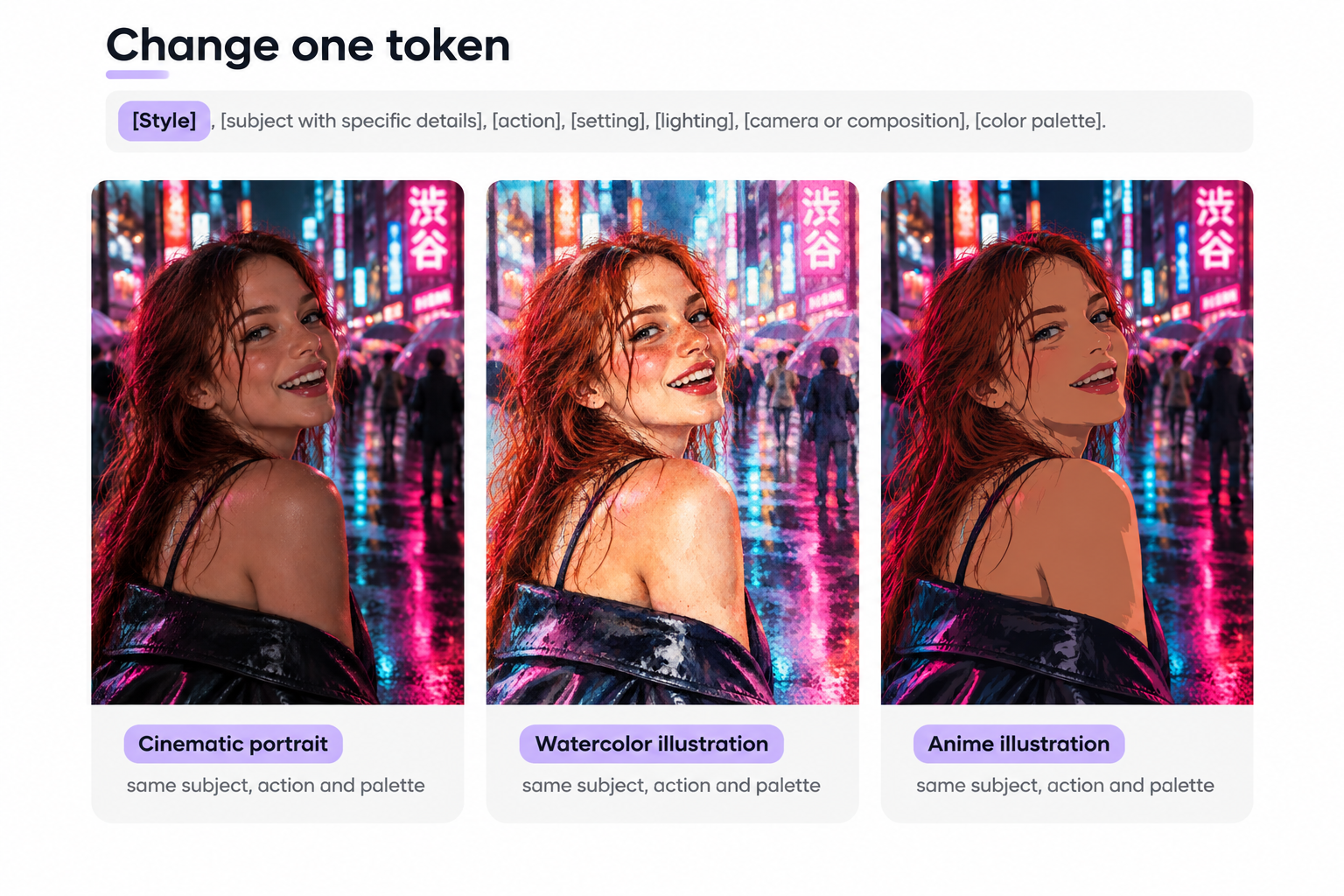
Use this formula to create images in any category below.
Copy-paste library: 100+ ai images prompts by style
The whole library of image prompts drops into any ai image generator. Copy an image prompt, tweak one variable, generate images.
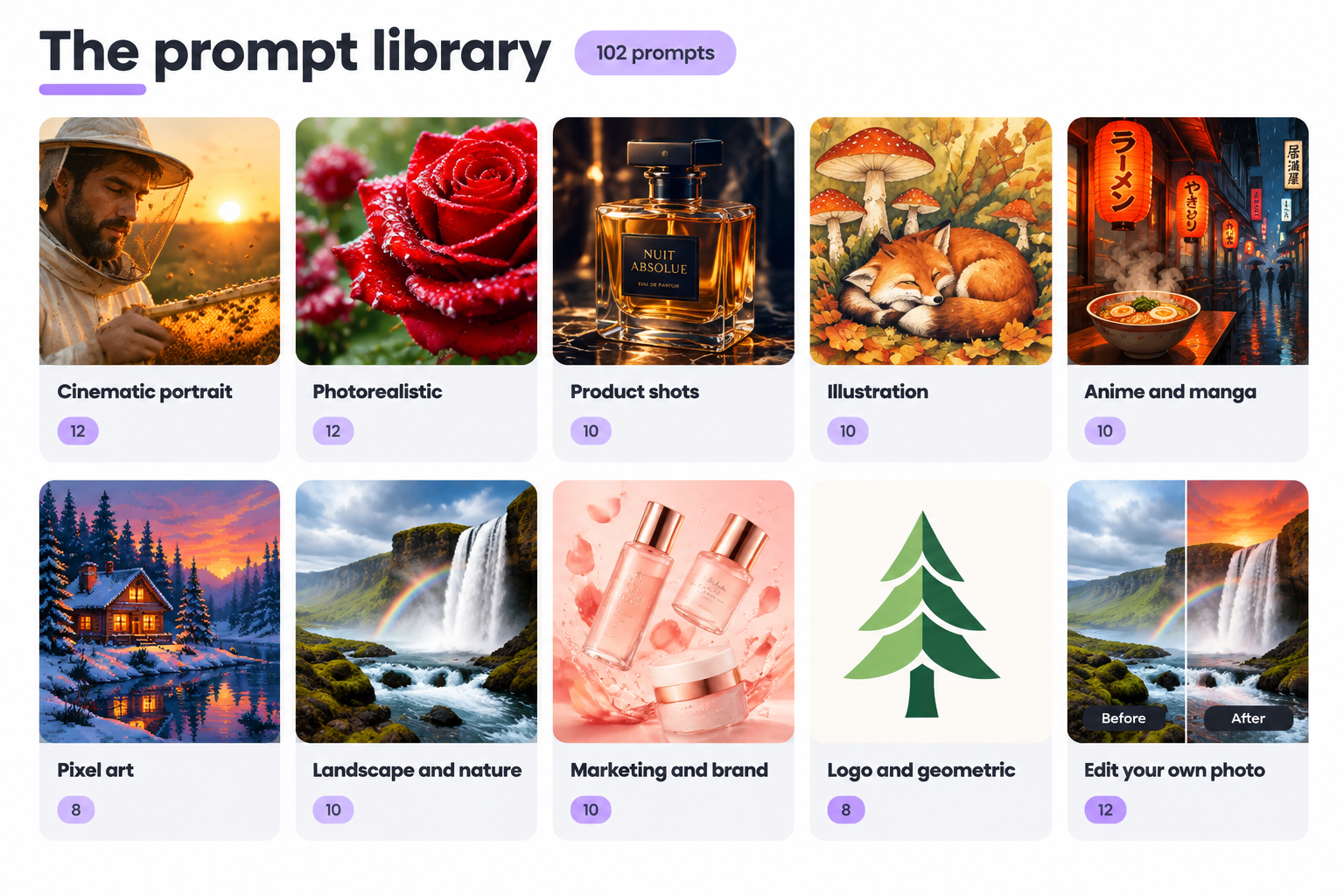
Everything from cinematic photo prompts to pixel art to ai photo prompts for editing your own photo lives here. Save the ai image prompts you like. You will reuse them more than you think.
Cinematic portrait photo prompts (12)
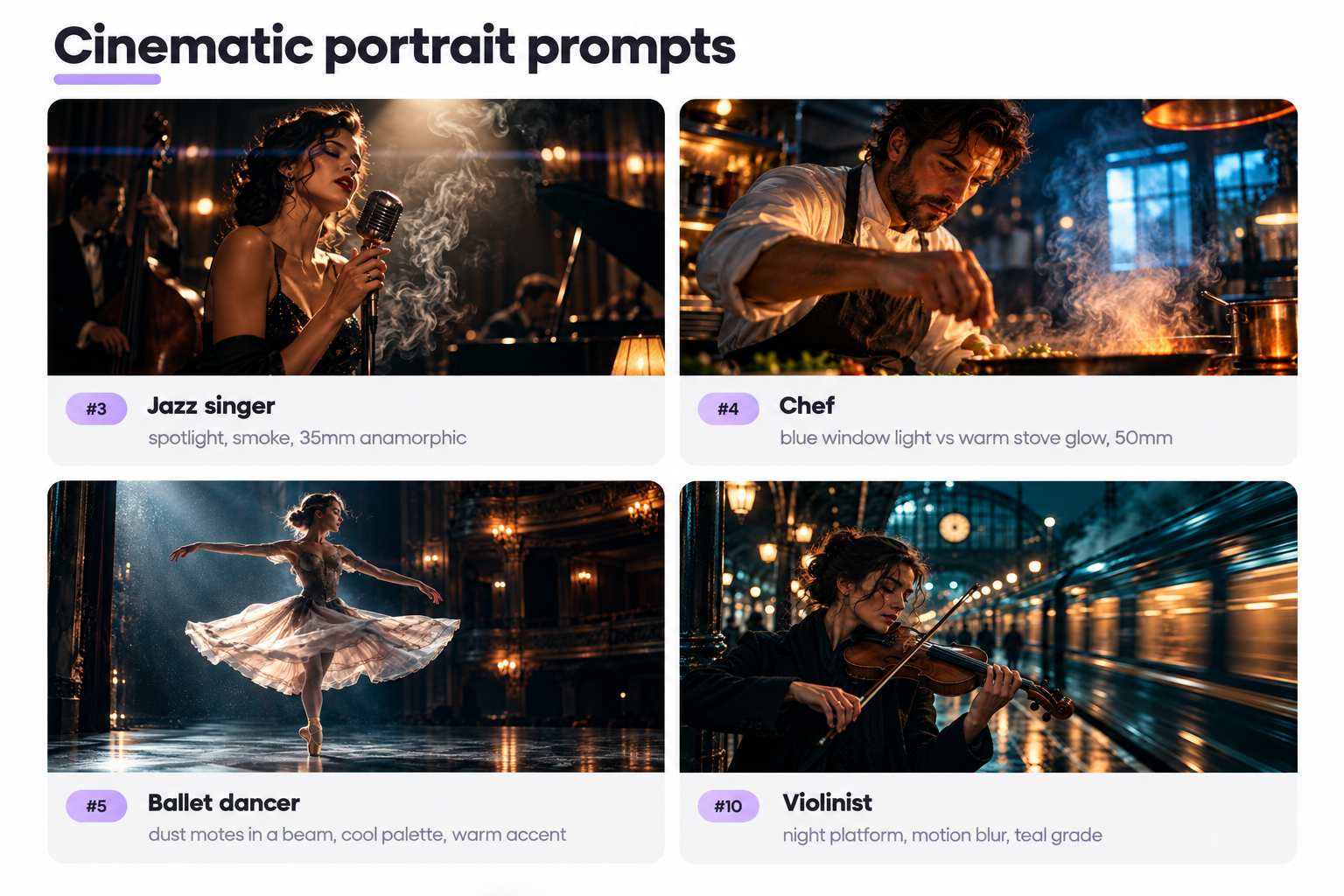
Cinematic photo prompts lean on lens choice, lighting direction, and a specific color palette.
Name the focal length, decide where the light comes from, pick a mood.
- Close-up cinematic portrait of a young woman with rain-soaked hair, hard side light from a shop sign, shallow depth of field, 85mm, teal and amber.
- Cinematic close-up of an elderly fisherman at dawn, salt spray, warm rim light, 50mm, Kodak Portra 400 look.
- Moody cinematic shot of a jazz singer under a spotlight, smoke curling around the microphone, high contrast, blurred background, 35mm anamorphic.
- Cinematic close-up of a chef in a steaming kitchen, blue window light against warm stove glow, hands in motion, 50mm, narrow focus.
- Cinematic shot of a ballet dancer mid-turn on an empty stage, dust motes in a beam, cool palette with a warm accent.
- Cinematic close-up of a boxer between rounds, sweat glistening, red gloves on the ropes, hard studio light, tight framing.
- Cinematic portrait of a young woman reading at a rainy window, soft lighting, warm interior against cool blue.
- Cinematic shot of a beekeeper in golden hour sunlight, honeycomb in hands, bees in soft focus, amber palette, 85mm.
- Cinematic close-up of a mechanic under the hood of a vintage car, sparks flying, hard side light, high contrast.
- Cinematic shot of a violinist on a night train platform, station lights blurred, motion blur on carriages, cool teal grade.
- Cinematic close-up of a young woman in a red raincoat crossing a wet Tokyo street, pavement reflections, cyberpunk grade.
- Cinematic shot of a grandfather teaching his grandson to fish at sunrise, backlit silhouettes, warm palette, wide angle view.
Photorealistic ai generated images (12)
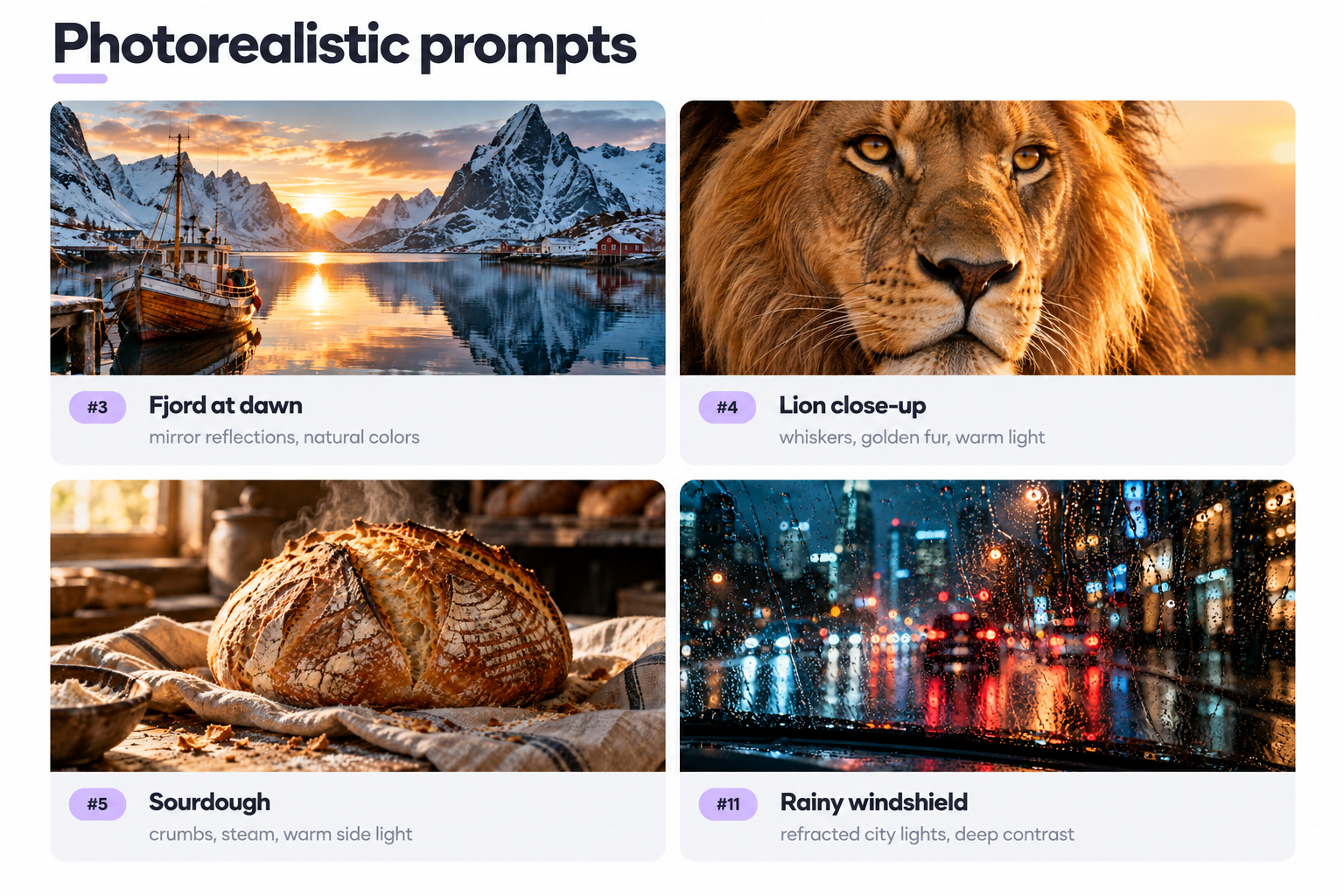
Photorealistic realistic images need surface detail, believable light, and honest imperfections. Ask for high resolution. Ask for texture. Ask for the kind of soft shadow a real camera would capture.
- Photorealistic image of a steaming ceramic coffee cup on weathered oak, morning sunlight through a window, dust particles visible, ultra-high resolution.
- Photorealistic close-up of dew drops on a red rose petal, macro lens, natural lighting, sharp focus against a blurred background of green foliage.
- Photorealistic photo of a wooden fishing boat on a Norwegian fjord at dawn, snow capped mountains reflected in the water, natural colors.
- Photorealistic photo of a lion’s face in extreme close-up, whiskers visible, golden fur, warm savanna light.
- Photorealistic photo of a freshly baked sourdough on linen, crumbs scattered, steam rising, warm side light from a bakery window.
- Photorealistic photo of a young woman running through a wheat field at sunset, wind sweeping the wheat, warm backlight, wide-angle.
- Photorealistic photo of a leather-bound journal open on a desk, fountain pen resting on the page, soft green banker’s-lamp light, amber tones.
- Photorealistic photo of a snow leopard on a Himalayan ledge, thick fur ruffled by wind, snow capped mountains behind, crisp contrast.
- Photorealistic photo of a chef’s hands kneading dough on a wooden board, flour dust in the air, warm kitchen light from above.
- Photorealistic photo of a vintage Leica on a wooden windowsill, morning light catching the chrome, reflective surfaces, blurred city street.
- Photorealistic photo of raindrops on a car windshield at night, city lights refracted through the water, cool palette, deep contrast.
- Photorealistic photo of a bumblebee mid-flight approaching a lavender flower, wings blurred, natural light, macro lens.
Product shot prompt examples (10)
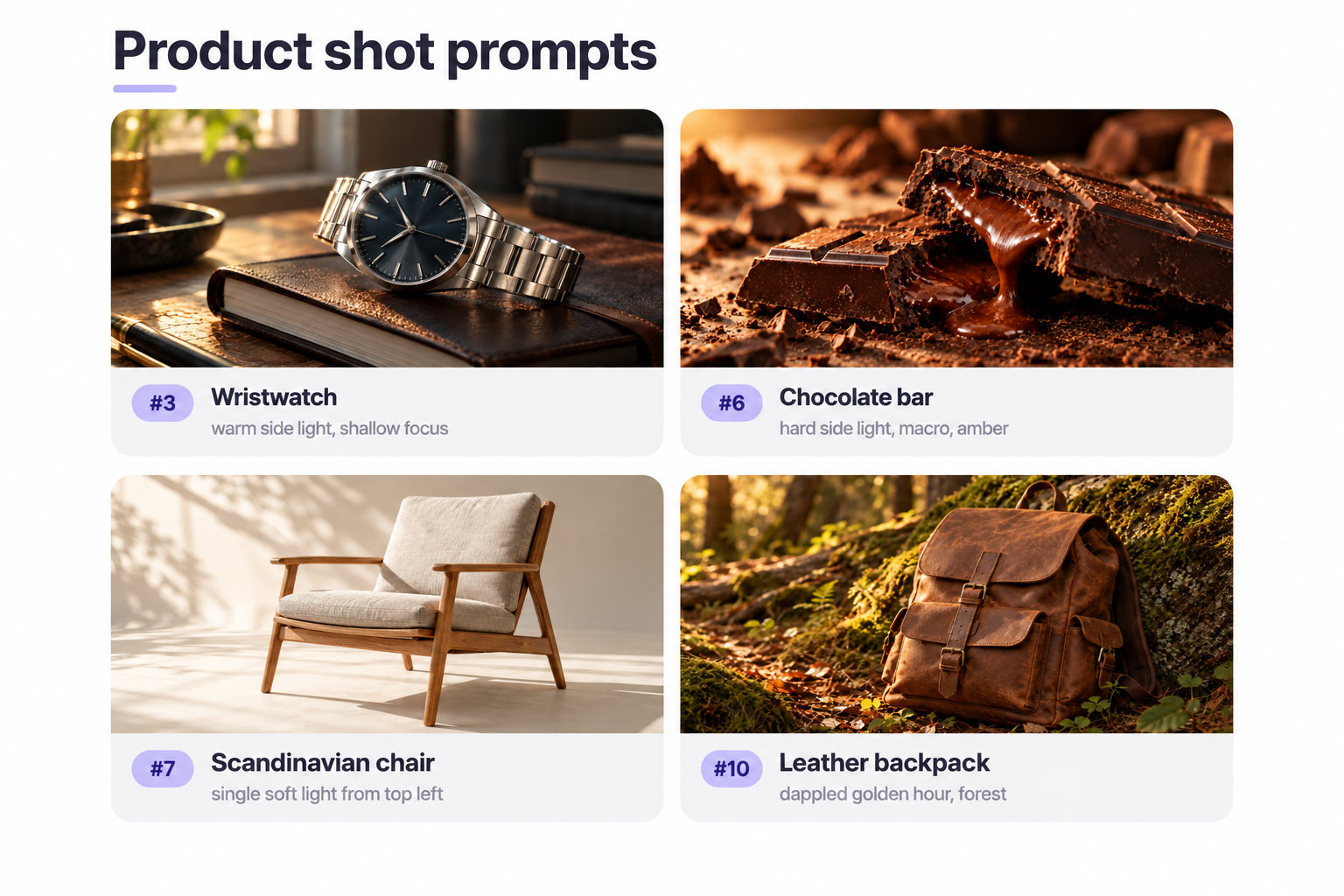
Product photo prompts live and die on light. Studio lighting, reflective surfaces, and a clear surface do most of the work.
- Studio lighting product image of a luxury perfume bottle on black marble, cool blue rim light against warm amber liquid, high contrast.
- Product shot of a wireless headset floating against a soft pastel gradient, minimalist 3D render.
- Product shot of a stainless wristwatch on a dark leather notebook, warm side light, shallow focus, magazine style.
- Product photo of a matte ceramic skincare jar with a cracked geode inside, window light, marble surface, minimal composition.
- Product photo of running shoes on a rain-slicked track, soft motion streaks behind, cool palette.
- Product shot of an artisan chocolate bar snapped in half, molten center flowing, amber palette, hard side light, macro.
- Product shot of a minimal Scandinavian chair on cream, single soft light from top left, wide-angle.
- Product photo of a craft beer bottle with condensation on a wet bar counter, warm pub light, bokeh string lights.
- Product shot of a smartphone floating above a hand, screen glowing, cool palette, minimalist background.
- Product photo of a leather backpack against a mossy rock in a forest, dappled golden hour, amber palette.
Illustration prompt examples (10)
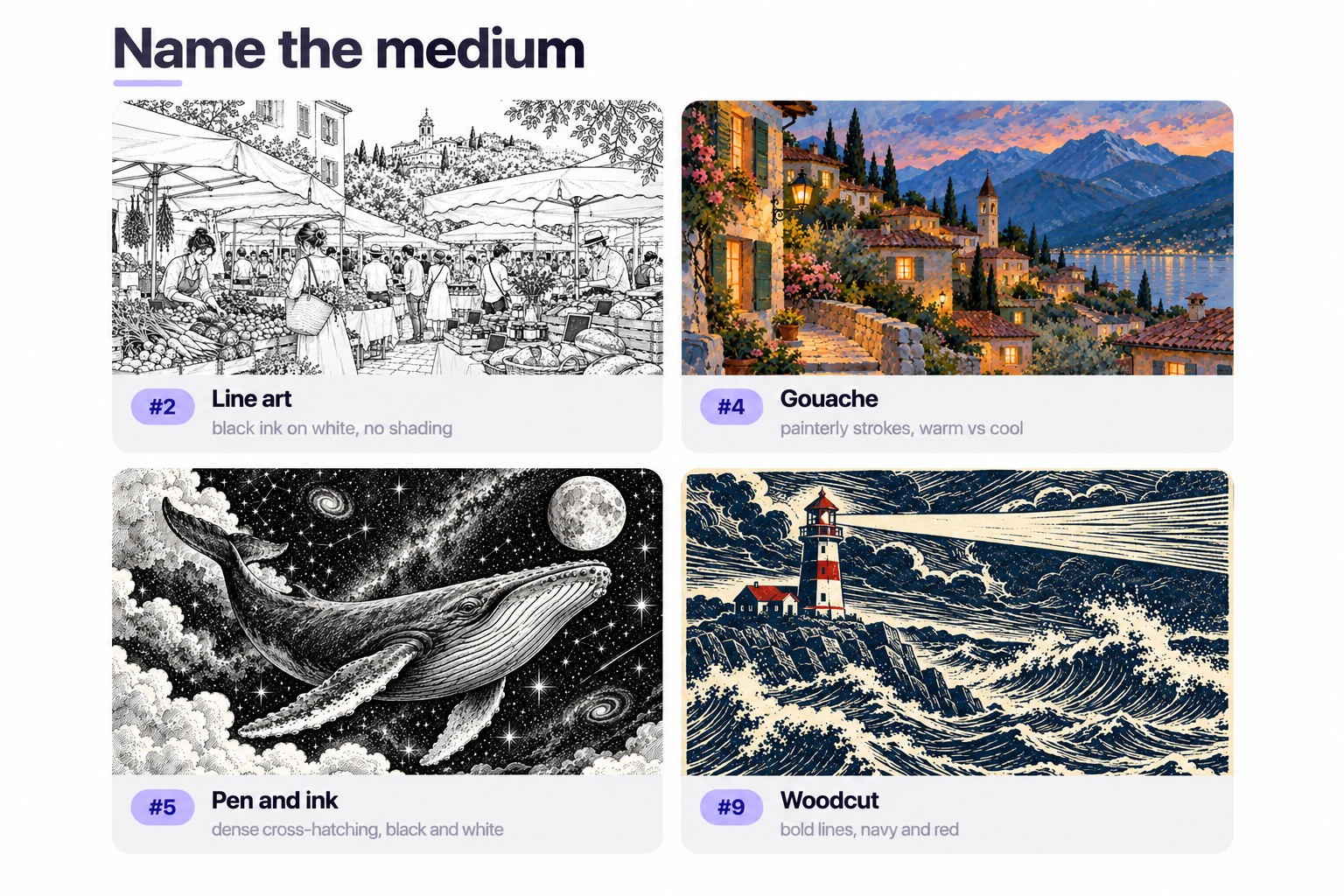
Illustration ai photo prompts need you to name the medium. Watercolor. Gouache. Line art. Woodcut. Flat vector.
Each medium carries its own palette and clean lines discipline. Skip the medium and the model reverts to generic “digital painting” mush. Every prompt example below names the medium up front.
- Watercolor illustration of a fox curled asleep under mushrooms, soft washes, amber palette, hand-painted texture, storybook.
- Line art illustration of a bustling farmer’s market, black ink on white, precise linework, no shading, editorial, 300 dpi.
- Flat vector illustration of a cozy living room in autumn, muted palette, no gradients, editorial style.
- Gouache illustration of a mountain village at twilight, painterly strokes, warm windows against a cool sky, storybook.
- Pen and ink illustration of a whale swimming through a starry sky, dense cross-hatching, black and white, mystical.
- Isometric illustration of a tiny apartment interior, pastel palette, cutaway view.
- Botanical illustration of a fig branch with cross-sectioned fruit, scientific accuracy, muted palette, cream, textbook style.
- Chalkboard illustration of a coffee shop menu with hand-drawn typography, white on dark, amber accents.
- Woodcut-style illustration of a stormy sea with a lone lighthouse, bold lines, limited palette of navy and red.
- Editorial illustration of a person juggling laptops and phones, flat colors, geometric shapes, amber palette.
Anime and manga prompt examples (10)
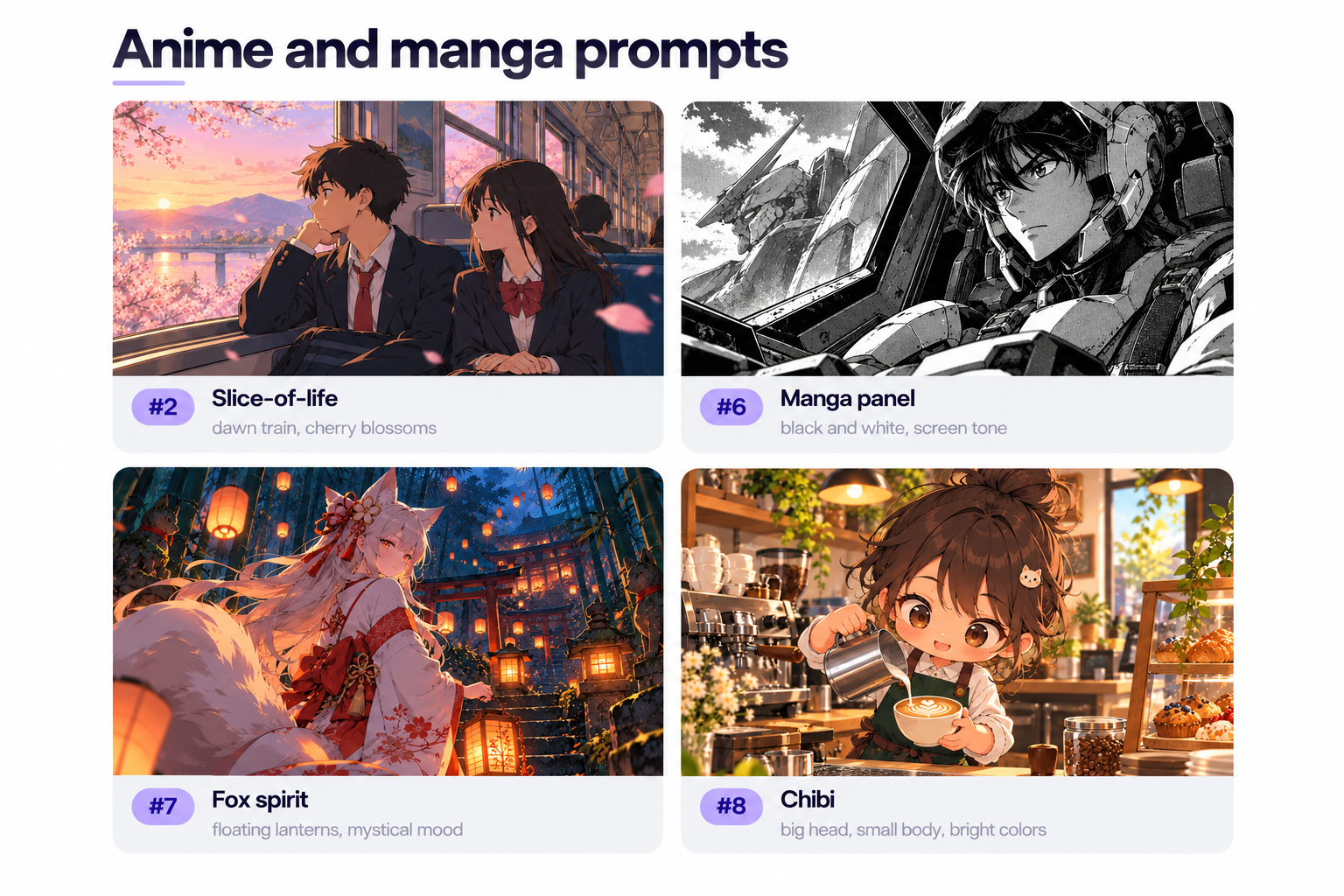
- Anime illustration of a young woman on a rooftop at sunset, hair blowing, cinematic composition, amber palette, Makoto Shinkai skies.
- Anime scene of two students on a train at dawn, soft light through the windows, cherry blossoms floating past, slice-of-life.
- Anime illustration of a swordsman under falling snow, hard side light from a lantern, cool palette with a warm accent, Ghibli-inspired.
- Anime illustration of a magical girl transformation on a moonlit rooftop, glowing particles, dramatic lighting, vibrant color.
- Anime scene of a cozy ramen shop at night, steam rising, warm interior light, rainy street outside, calm mood.
- Manga panel of a mecha pilot in the cockpit, tight framing, dramatic lighting, black and white with screen tone.
- Anime illustration of a fox spirit in a bamboo forest, floating lanterns, mystical mood, cool palette with warm glow.
- Chibi illustration of a barista mid-pour, big head small body proportions, playful, bright colors.
- Anime illustration of a young woman on a bicycle riding through a coastal town, wind in her hair, golden hour.
- Anime cyberpunk scene of a hacker in a neon-lit apartment, monitors casting cool light, warm accent from a desk lamp, blurred typing hands.
Pixel art prompt examples (8)
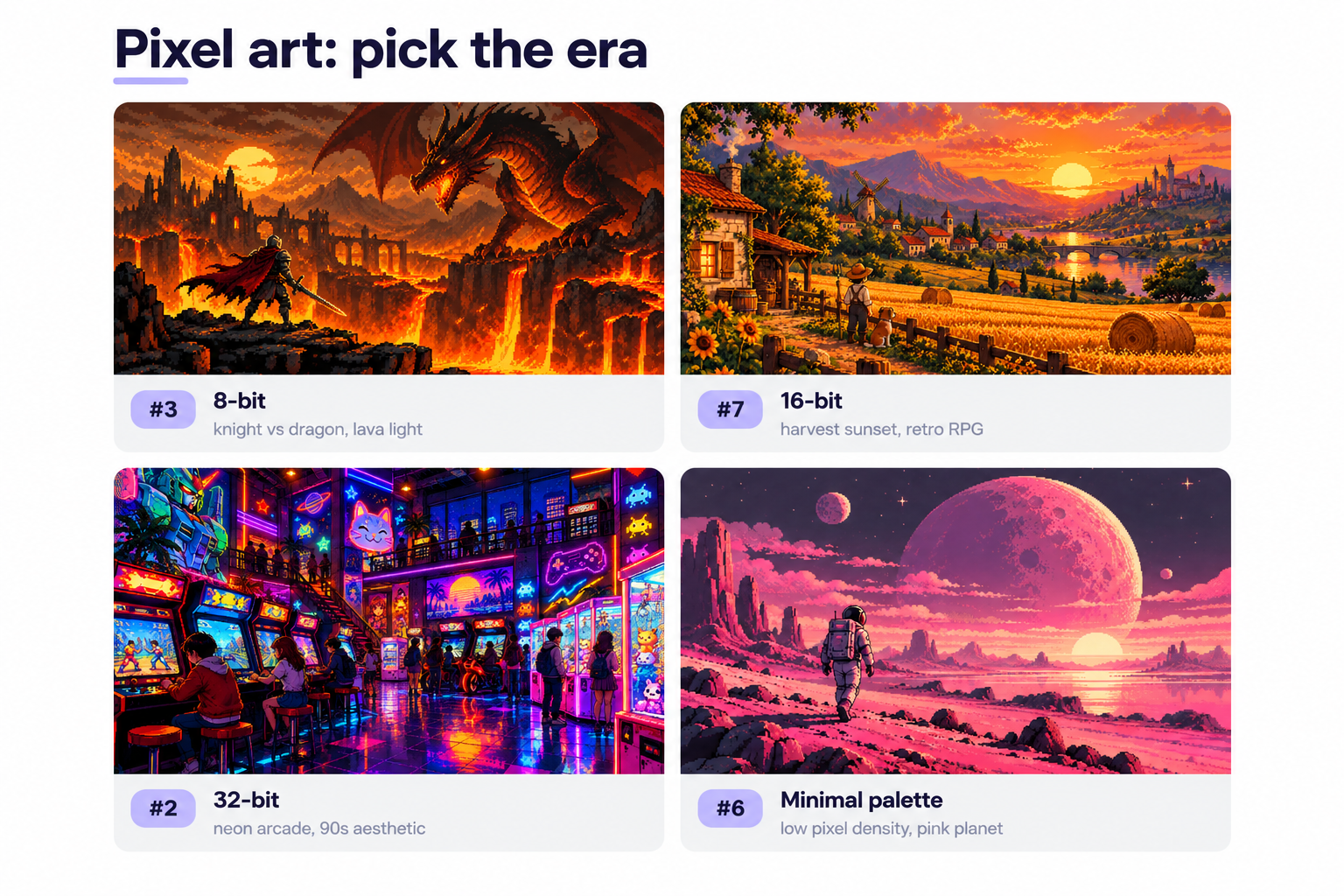
Pixel art image prompts benefit from naming the era (8-bit, 16-bit, 32-bit) and setting a small palette. Small palettes make pixel art read as pixel art rather than a downsampled render.
- 16-bit pixel art of a cozy cabin in a snowy forest at dusk, warm lit windows, palette of blues and warm oranges.
- 32-bit pixel art of a bustling arcade with animated neon signs, deep contrast, wide angle, 90s aesthetic.
- Pixel art scene of a knight at a cliff facing a dragon, hard side light from lava below, amber tones, 8-bit.
- Isometric pixel art of a tiny magical shop interior, potion bottles glowing, warm palette, high pixel density.
- Pixel art portrait of a cyberpunk hacker with neon glasses, close-up, vibrant pink and cyan.
- Pixel art of a lonely astronaut walking on a pink alien planet, low pixel density, minimal palette, cinematic.
- 16-bit pixel art of a farmer’s field at harvest sunset, warm tones, retro RPG aesthetic.
- Pixel art of a rainy Tokyo alley at night with a ramen cart, neon signs in puddles, cool palette with warm accents.
Landscape and nature prompt examples (10)
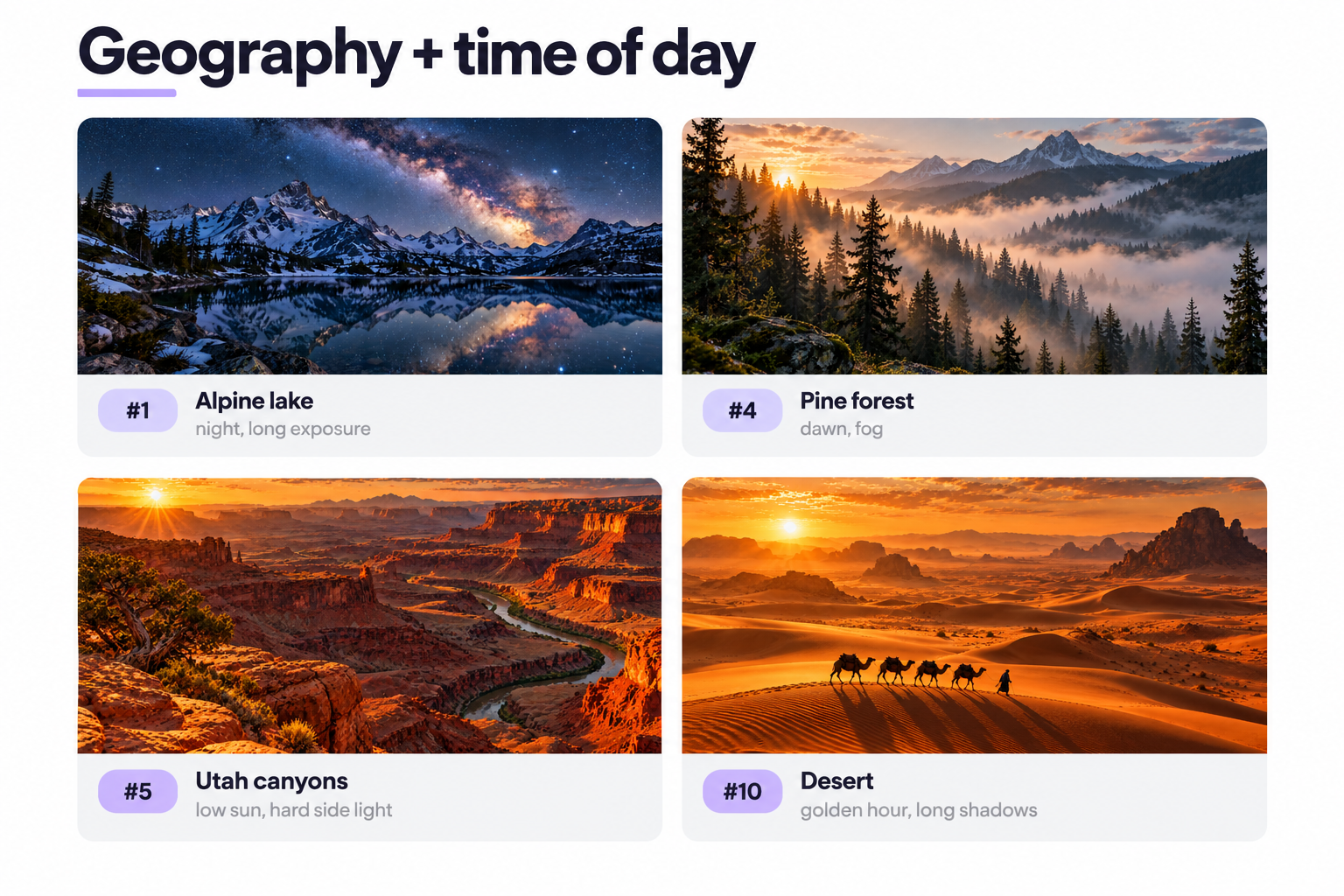
Landscape prompt examples want scale and light. Name the geography and time of day, let the model handle atmosphere.
- Wide-angle photo of the Milky Way over snow capped mountains, alpine lake reflecting the stars, cool palette, long exposure.
- Landscape photo of a Provence lavender field at golden hour, wide-angle, amber tones, soft lighting.
- Aerial photo of a tropical beach where turquoise water meets white sand, palm shadows on the sand.
- Landscape photo of a foggy pine forest at dawn, soft light through the trees, muted palette, mysterious.
- Landscape photo of red Utah sandstone canyons, hard side light from a low sun, amber tones, wide-angle.
- Landscape photo of an Icelandic waterfall with a rainbow in the mist, cool palette, silky long exposure.
- Landscape photo of a Japanese garden in autumn, red maple leaves reflected in a koi pond, soft light, painterly.
- Landscape photo of a stormy coastline with waves on black volcanic rocks, dramatic lighting, cool palette.
- Landscape photo of snowy peaks at sunrise from a base camp tent, amber ridges, cool blue valley.
- Landscape photo of an endless desert with a lone camel caravan casting long shadows, golden hour, amber palette, minimalist.
Marketing and brand campaign prompt examples (10)
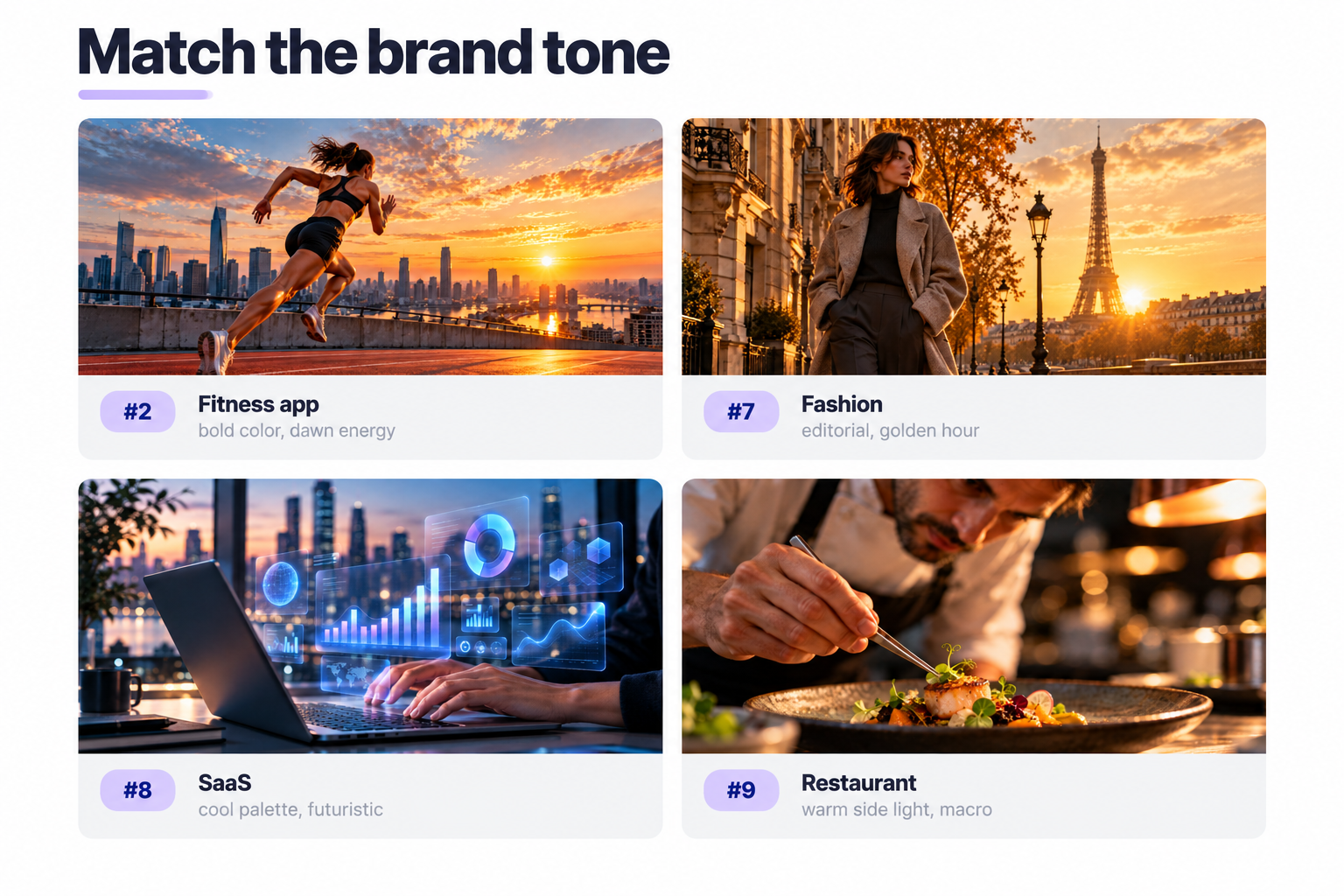
These marketing materials prompt examples assume you know your target audience and brand tone. Swap out the model wearing details, setting, and palette to match your visual styles.
- Campaign shot of a young woman wearing wireless headphones dancing in a sunlit apartment, warm tones, arms in motion blur, editorial fashion.
- Hero shot for a fitness app: athlete mid-sprint on a rooftop track at dawn, wide-angle, bold color, cinematic.
- Lifestyle campaign of a family cooking in a bright kitchen, natural lighting, candid.
- E-commerce banner: floating skincare products on a soft pink gradient, studio lighting, minimalist.
- Travel brand shot: silhouette of a hiker facing a mountain sunset, wide-angle, cinematic.
- Lifestyle shot of remote workers around a laptop in a cozy living room, natural window light, candid.
- Fashion campaign of a model wearing an oversized wool coat on a Parisian street at golden hour, editorial.
- SaaS marketing shot of hands typing on a laptop with holographic data floating above, cool palette, futuristic.
- Restaurant campaign of a chef plating with tweezers, macro lens, warm side light, narrow focus.
- Fintech shot of a smartphone on slate with a soft blue glow around it, minimalist.
Logo and geometric design prompt examples (8)
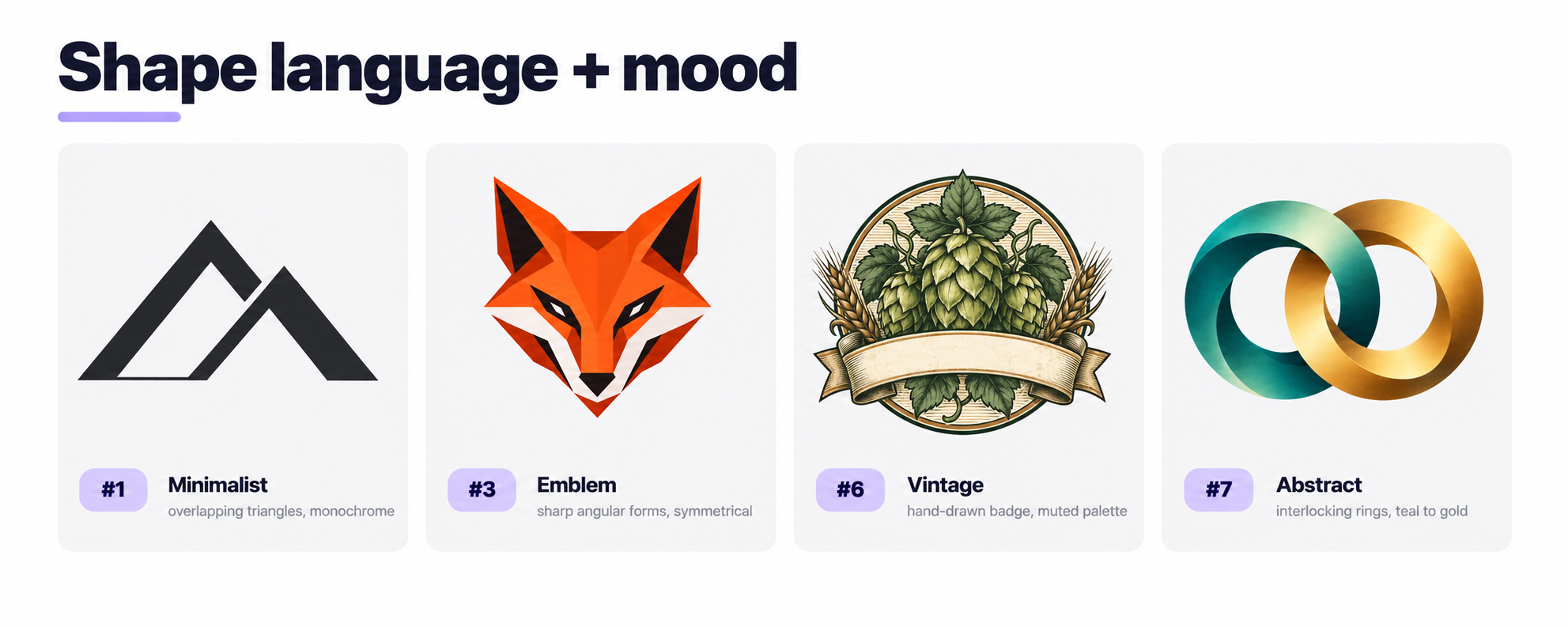
Logo design ai image prompts do best when you name the shape language and the mood. “Minimalist”, “vintage”, “editorial”. Ask for a transparent background if you plan to lift the logo out.
- Minimalist logo of a mountain peak formed by two overlapping triangles, monochrome, clean lines, geometric shapes, flat design.
- Logo of a steaming espresso silhouette with steam forming a leaf, amber palette, vector, transparent background.
- Emblem-style logo of a fox with sharp angular forms, bold color, symmetrical.
- Wordmark logo for a tech brand: bold sans-serif with a gradient of blue to violet, minimalist.
- Geometric brand mark combining a lowercase ‘e’ with a circuit trace, monochrome, tech aesthetic.
- Vintage logo badge for a craft brewery, hop leaves, banner ribbon, muted palette, hand-drawn.
- Abstract logo of interlocking rings for partnership, gradient of teal to gold, transparent background.
- Nature-inspired logo of a pine tree from triangular shapes, muted green, flat design.
Edit-your-own-photo prompt examples (12)
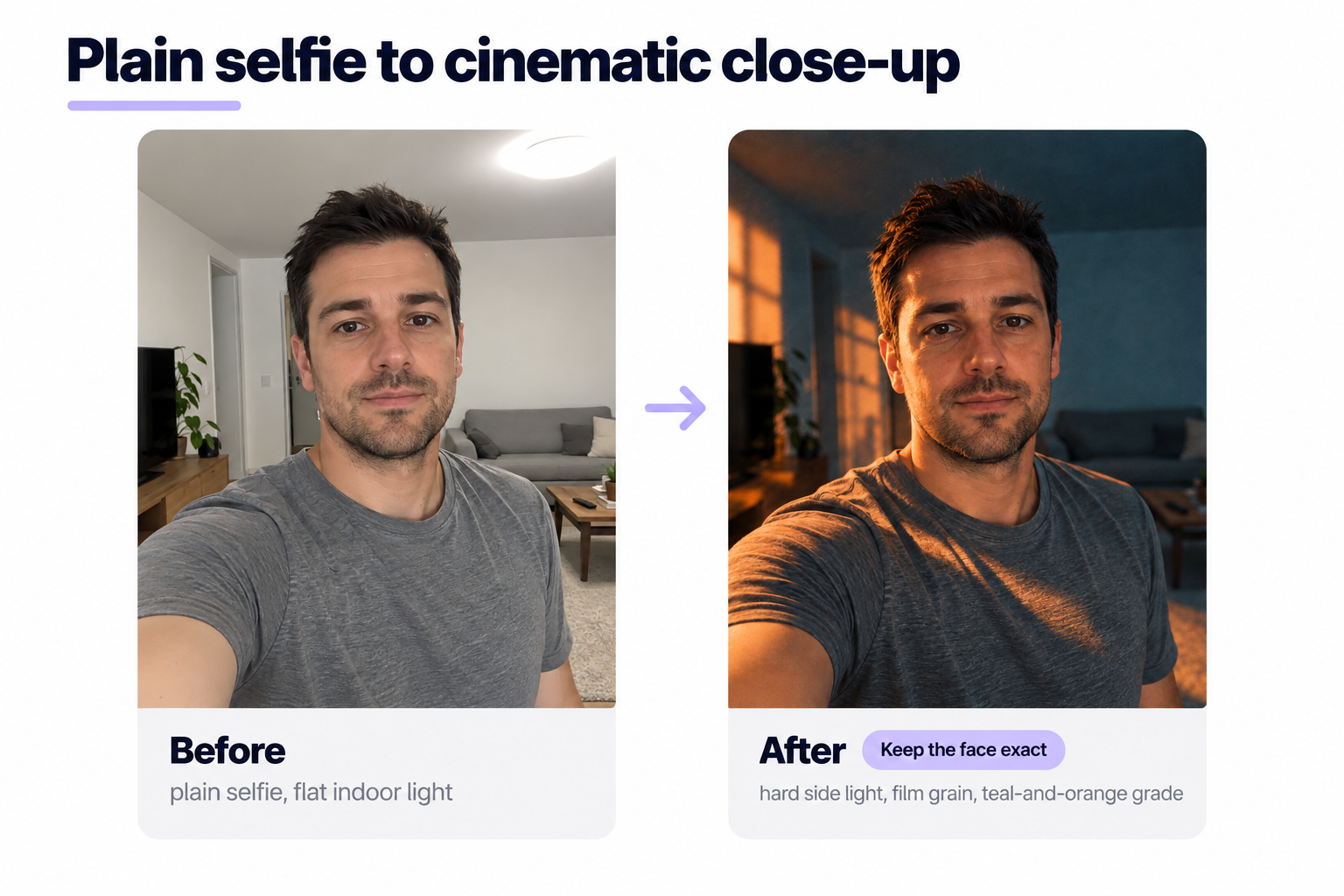
These ai photo prompts are edit prompts, not from-scratch. You upload a reference image (your own photo, a selfie, a product shot), and the ai tool restyles or replaces parts of it.
Say what to change. Say what to preserve. “Keep the face exact” saves you from being turned into a stranger.
- Turn this reference photo into a cinematic portrait with hard side light, film grain, teal-and-orange grade. Keep the face exact.
- Take this selfie and place the subject on a tropical beach at sunset. Match the light to the new background.
- Replace the background of this reference photo with a cozy living room at dusk, warm lamp light. Preserve face and pose.
- Transform this image into an anime illustration with soft cel shading and a warm palette. Preserve identity.
- Convert this profile image into a professional headshot with studio lighting, neutral background, subtle shadows behind the shoulders. Keep facial features accurate.
- Restyle my selfie as a black-and-white 1970s film photograph, high grain, natural light, contrast pushed.
- Take my photo and give me a golden hour glow, amber tones, soft lighting. Keep the pose and clothes intact.
- Turn this profile image into a watercolor portrait, soft washes, amber palette, hand-painted texture. Keep facial features recognizable.
- Restyle this reference photo as a cyberpunk close-up, neon pink and cyan lighting, wet street reflections.
- Replace only the sky in this reference photo with a dramatic pink and orange sunset. Match light temperature on the ground.
- Take this product image and place the item on a wooden countertop with soft side light, gentle highlights.
- Turn this group photo into an oil painting in Dutch Golden Age style, dramatic side light, painterly texture. Preserve identity.
That is 102 ai images prompts and ai generated images templates. Copy any you like, start creating.
How to write good AI prompts for images (from scratch)
Copy-paste is a shortcut. Writing ai image prompts is a skill.
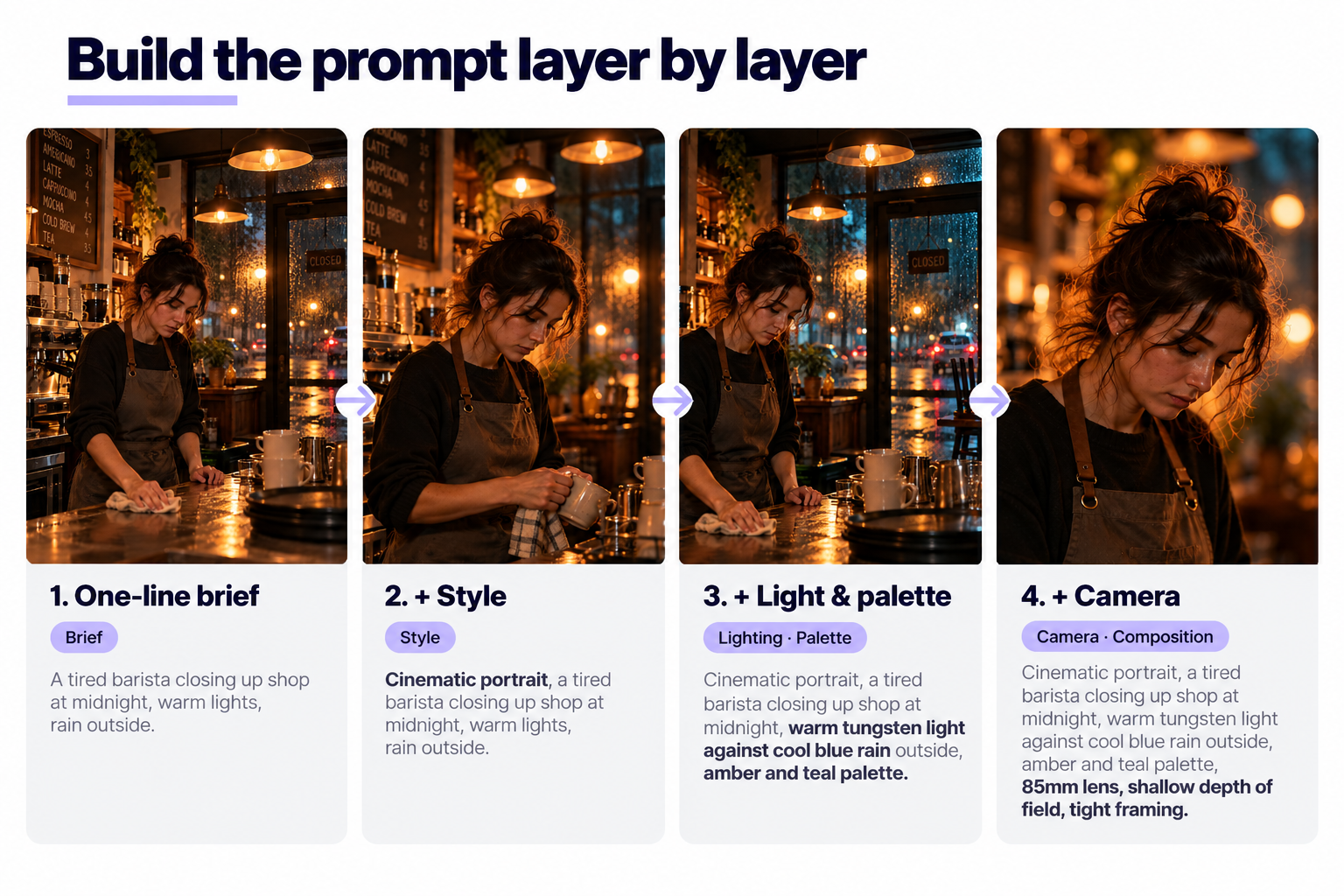
Start with a one-line brief
Write the shot in one sentence, as if briefing a photographer. “A tired barista closing up shop at midnight, warm lights, rain outside.” That already contains subject, action, setting, mood.
Layer specific details, one axis at a time
Stack visual elements on top.
- Style: cinematic portrait, photorealistic photo, watercolor illustration, pixel art, flat vector.
- Camera or medium: 85mm lens, macro lens, wide-angle, isometric.
- Lighting: golden hour, soft, studio, hard side light.
- Palette: amber tones, cool teal and amber, muted pastels, vibrant.
- Composition: shallow depth of field, blurred background, tight framing, low angle.
Add one at a time so you can see what each change does.
Use professional vocabulary the model was trained on
Words borrowed from cinematography, photography, and print carry weight. “Anamorphic”. “Chiaroscuro”. “Rim light”. “Kodachrome”. “Screen tone”. Naming a technique gets you closer than describing it vaguely.
Kill vague descriptions
“Beautiful”, “amazing”, “high quality”, “professional” mean nothing to the model. Replace each with something concrete: not “beautiful”, but “backlit at sunrise with warm rim light on the hair”.
Try juxtaposition for a surprise
Some of the best ai image prompts pair concepts that do not usually belong together. “Renaissance portrait of an astronaut”. “Baroque still life of gaming controllers”. Unexpected pairings force the ai models to invent something the training set never saw as-is.
Creative experimentation: iterate, do not restart
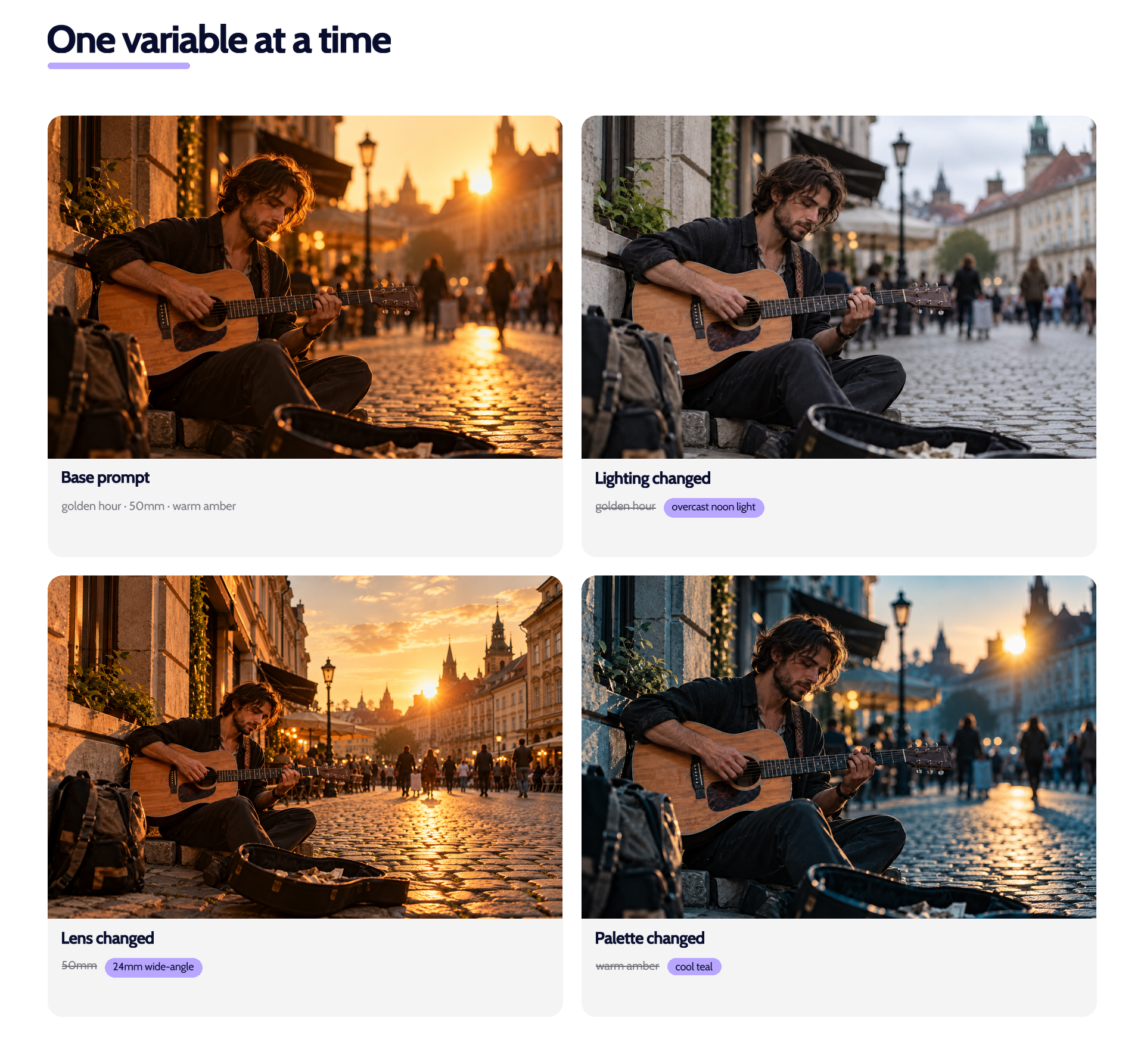
Most beginners start over when an image misses. Pros iterate. Change one thing.
The one-variable rule
Change one element per run when you generate images. Rewrite the whole prompt every time and you learn nothing. Swap “golden hour lighting” for “overcast noon light”, leave the rest, generate images again, and you know exactly what that change does.
Keep a log
Paste every prompt into a doc with a note on what you changed and what you got.
In a week you have a personal prompt library of ai photo prompts worth more than any generic list. In a month you have your own house style for visual storytelling.
Run A/B tests
Same subject, two prompts, generate images side by side, keep the winner. Repeat. That is how a prompt gets tuned into a template you reuse to create images at scale.
Rescue near-misses with edit prompts
When a generation is 80 percent there but the hands look like claws or the background is busy, do not regenerate. Use an edit prompt: “Fix the hands. Replace the background with a plain grey studio. Keep everything else.”
AI image generation across styles: match the tool to the job
Not every ai image generator is good at everything. Different ai models have different strengths. Rough map (shifts fast, treat as a snapshot):
| Model / tool | Best at | Weakness |
|---|---|---|
| Midjourney | Cinematic, artistic, illustration | Photorealistic faces at close range |
| DALL·E 3 (ChatGPT) | Following long detailed prompts, text-in-image | Fine-art styling, painterly detail |
| Stable Diffusion / Flux | Custom fine-tunes, local control | Setup overhead, sharper learning curve |
| Adobe Firefly | Commercially safe training data, brand-safe assets | Less experimental than Midjourney |
| Ideogram | Legible typography inside images | Painterly and fine-art work |
| Google Imagen 3 | Photorealism, natural composition | Fewer stylistic knobs |
| Eliten | One-click use inside a multi-tool workspace | Deep parameter control |
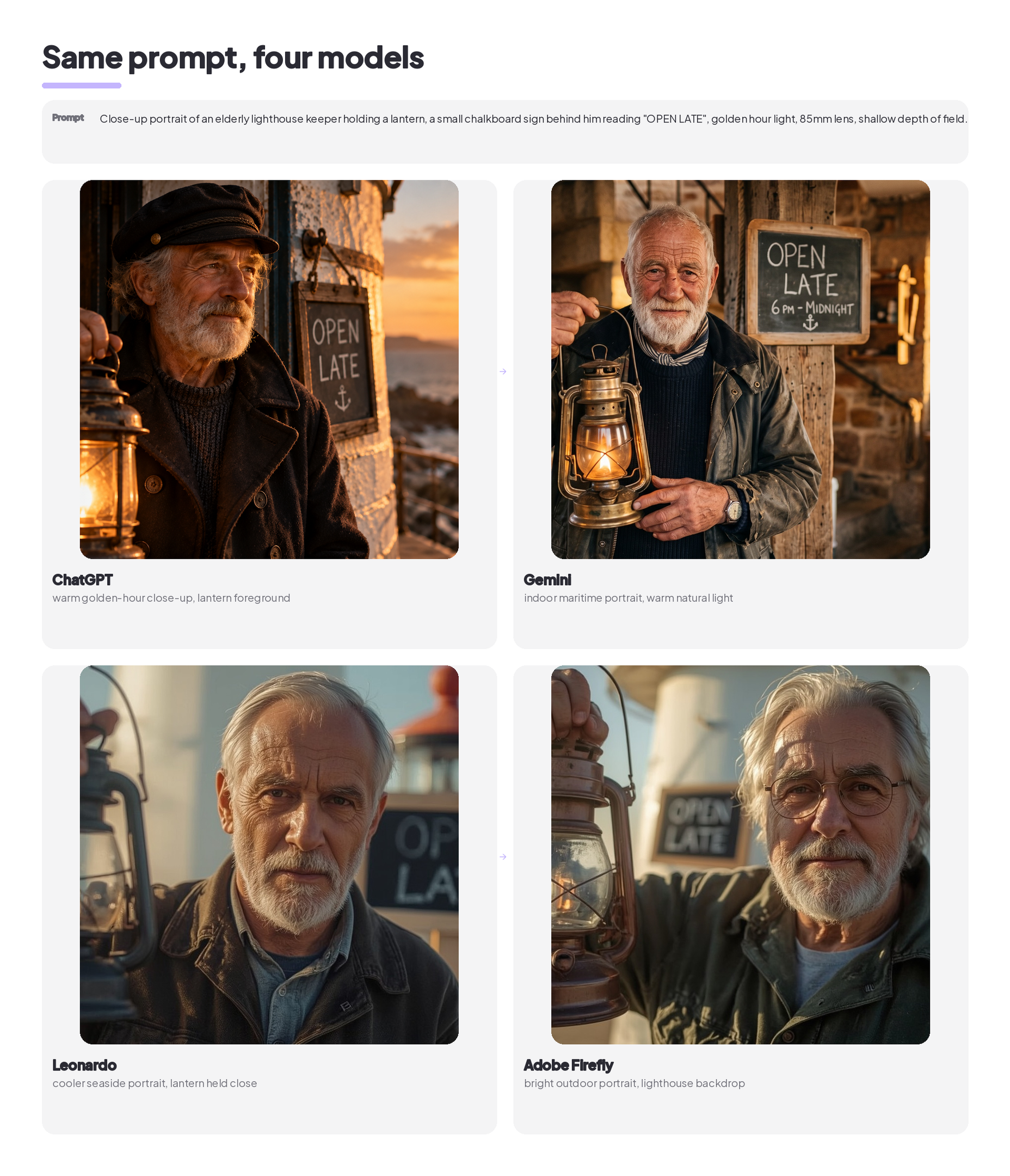
Match the ai image tool to the job. Cinematic close-up for a magazine? Midjourney or Flux. In-image typography for a poster? Ideogram or Firefly.
Fast sketch in your writing workspace? Eliten. Ecommerce mockup with legal cover? Firefly.
For style inspiration, Adobe Firefly publishes worked prompt examples that show the exact input alongside the output.
Brand, legal, and workflow considerations
The unglamorous half of using ai generated images at work.
Brand consistency
Lock in house photo prompts with your brand palette, typography reference, and shot style. Every marketer uses the same base, then customizes per campaign. Scattered marketing materials turn into a coherent look.
Prompt library and templates
Save winning image prompts and prompt examples to a central library (Notion, Airtable, a shared doc). Categorize by use case: hero banners, blog thumbnails, product mockups, social ads. Include editable variables. Note aspect ratios per surface.
Rights, licenses, commercial use
Every ai tool has its own license. Some allow commercial use on all plans, some gate it behind a paid tier, some restrict certain outputs entirely. A completely free plan often carries the strictest limits. Read the specific model’s terms before you ship. This matters more than any prompt trick.
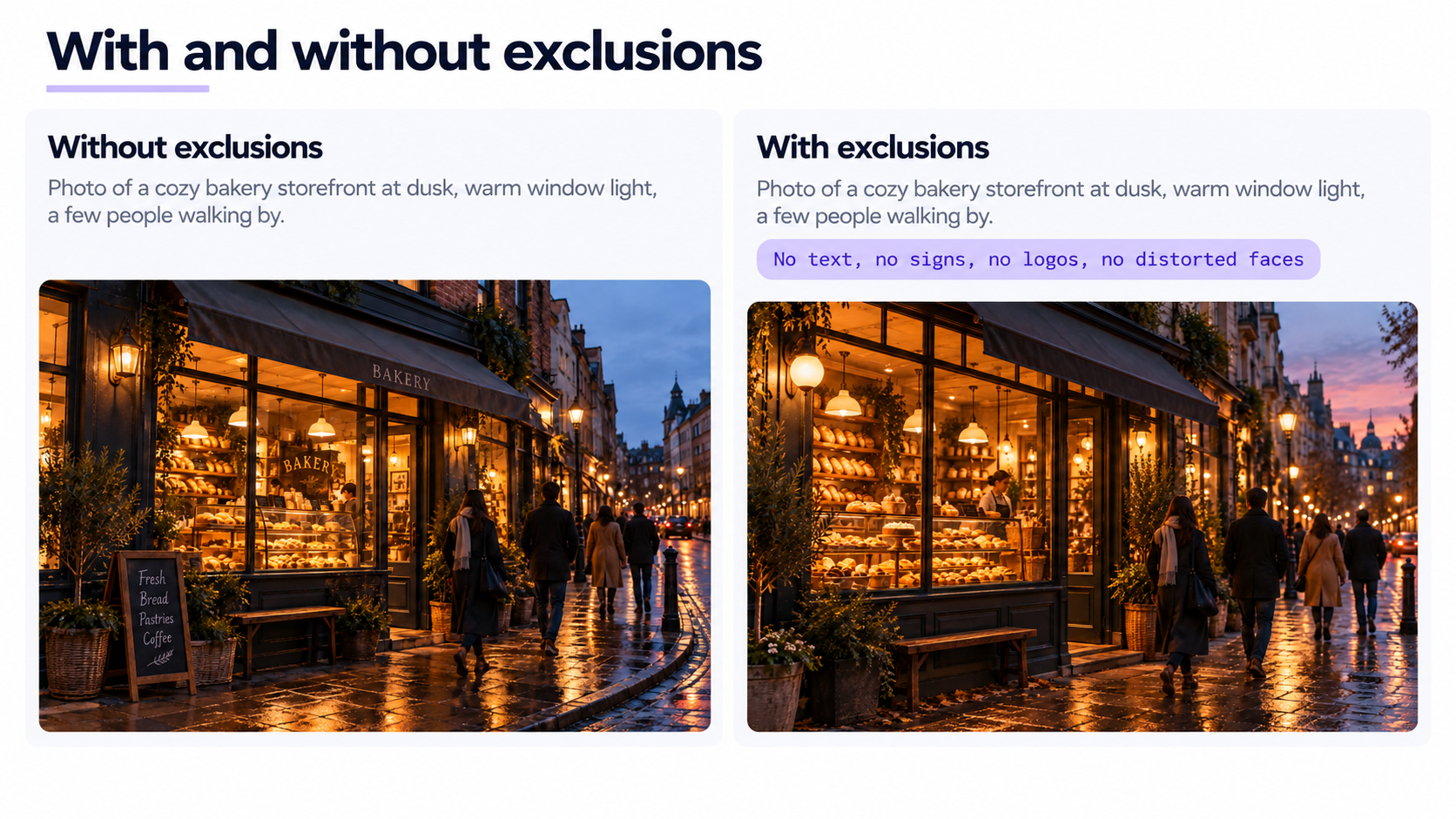
Exclusion prompts
Some models let you specify things to exclude. Others do not, so describe positively what you do want. Common exclusions: “no extra fingers, no distorted faces, no watermark, no text”. If not supported, be more precise upstream.
Measuring success with ai generated images
If you use ai image prompts and photo prompts to generate images for marketing, treat the ai generated images like any other creative asset. Attribution matters as much as the visual. The same ai images prompts can drive different campaign performance depending on template hygiene.
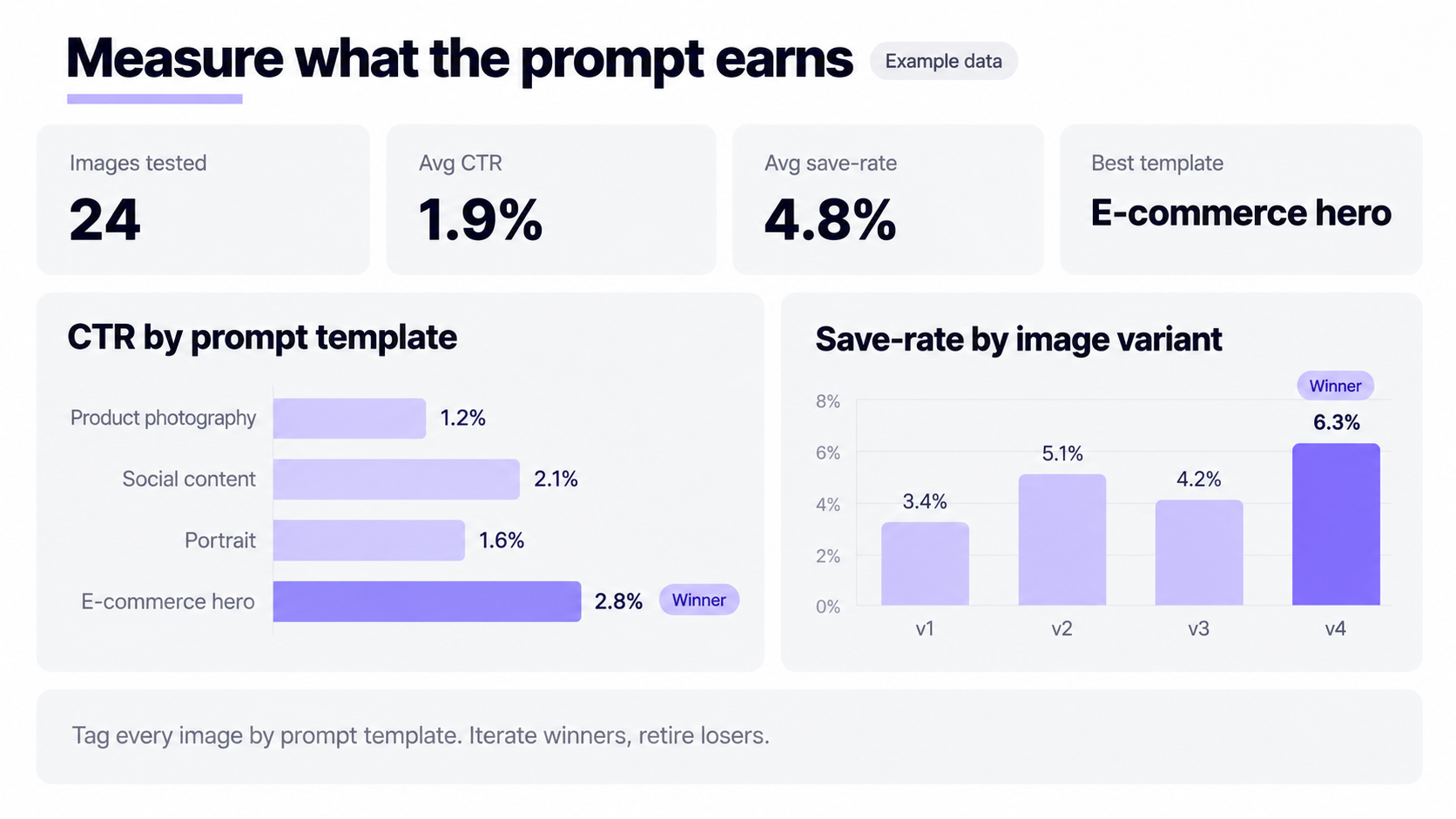
- Tag each image by prompt template to attribute performance back.
- Track engagement: CTR, save-rate, dwell time.
- Iterate winners. Retire losers.
- Run head-to-head prompt tests on the same ad slot and let the numbers pick.
Prompt engineering is a feedback loop between what you write and the final output. When you generate images for a new campaign, feed the last winner into the next brief.
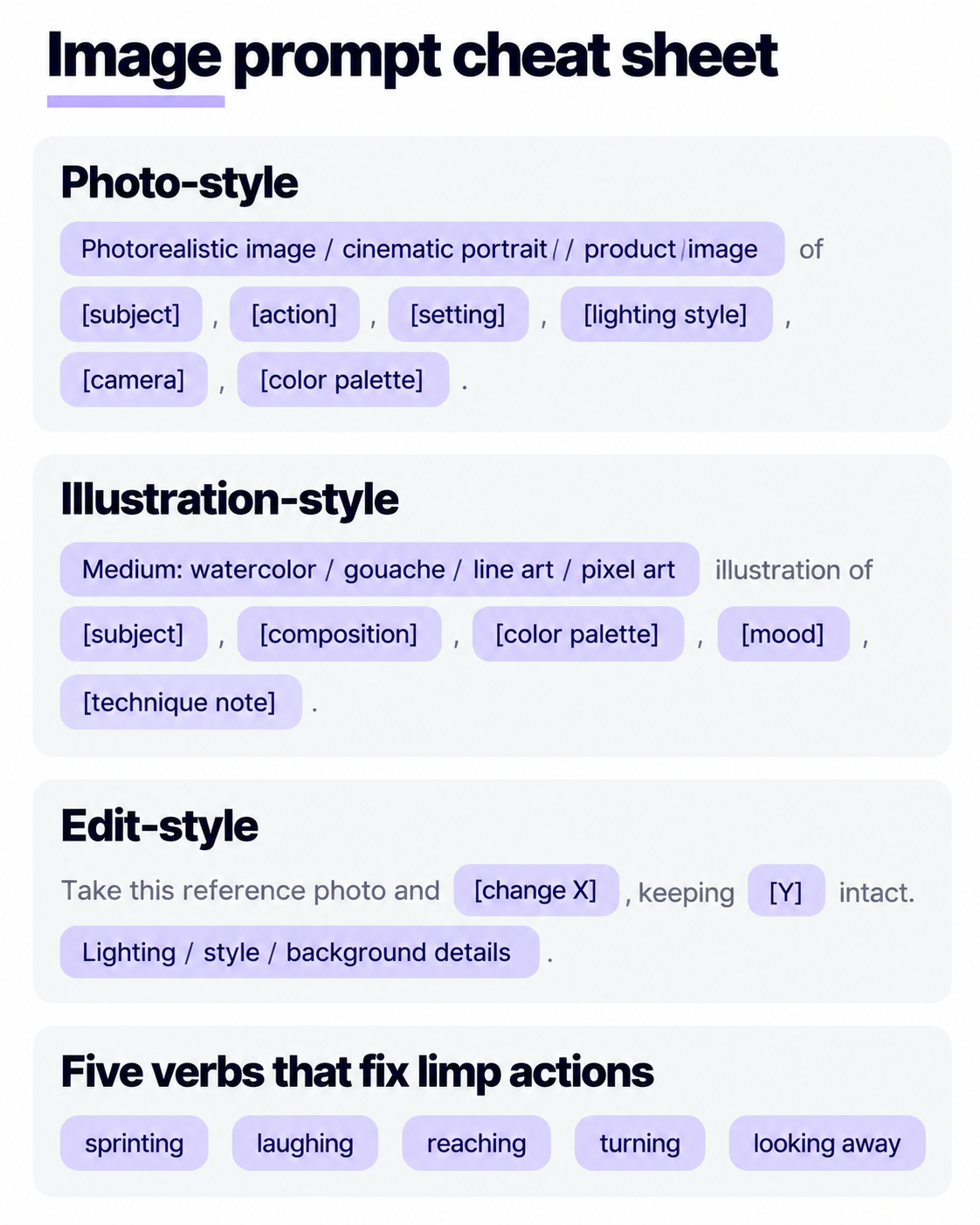
Quick reference: image prompts cheat sheet
Three formulas to keep in your head.
Photo-style:
[Photorealistic image / cinematic portrait / product image] of [subject], [action], [setting], [lighting style], [camera], [color palette].
Illustration-style:
[Medium: watercolor / gouache / line art / pixel art] illustration of [subject], [composition], [color palette], [mood], [technique note].
Edit-style:
Take this reference photo and [change X], keeping [Y] intact. [Lighting / style / background details].
Five verbs that fix limp subject actions: sprinting, laughing, pouring, reading, mid-turn.
Common exclusions: extra fingers, distorted faces, warped text, visible watermark, motion in a static scene.
FAQ
What are some trending AI photo prompts right now?
Cinematic close-ups with cool teal and warm amber grading dominate, followed by isometric illustration photo prompts for product marketing and painterly anime scenes in the Makoto Shinkai and Ghibli vein.
Photo prompts that restyle a selfie into a professional headshot or a cyberpunk close-up are heavily used too, because they start from a reference photo instead of asking the model to invent a face.
What are some good ai prompts for AI art using images?
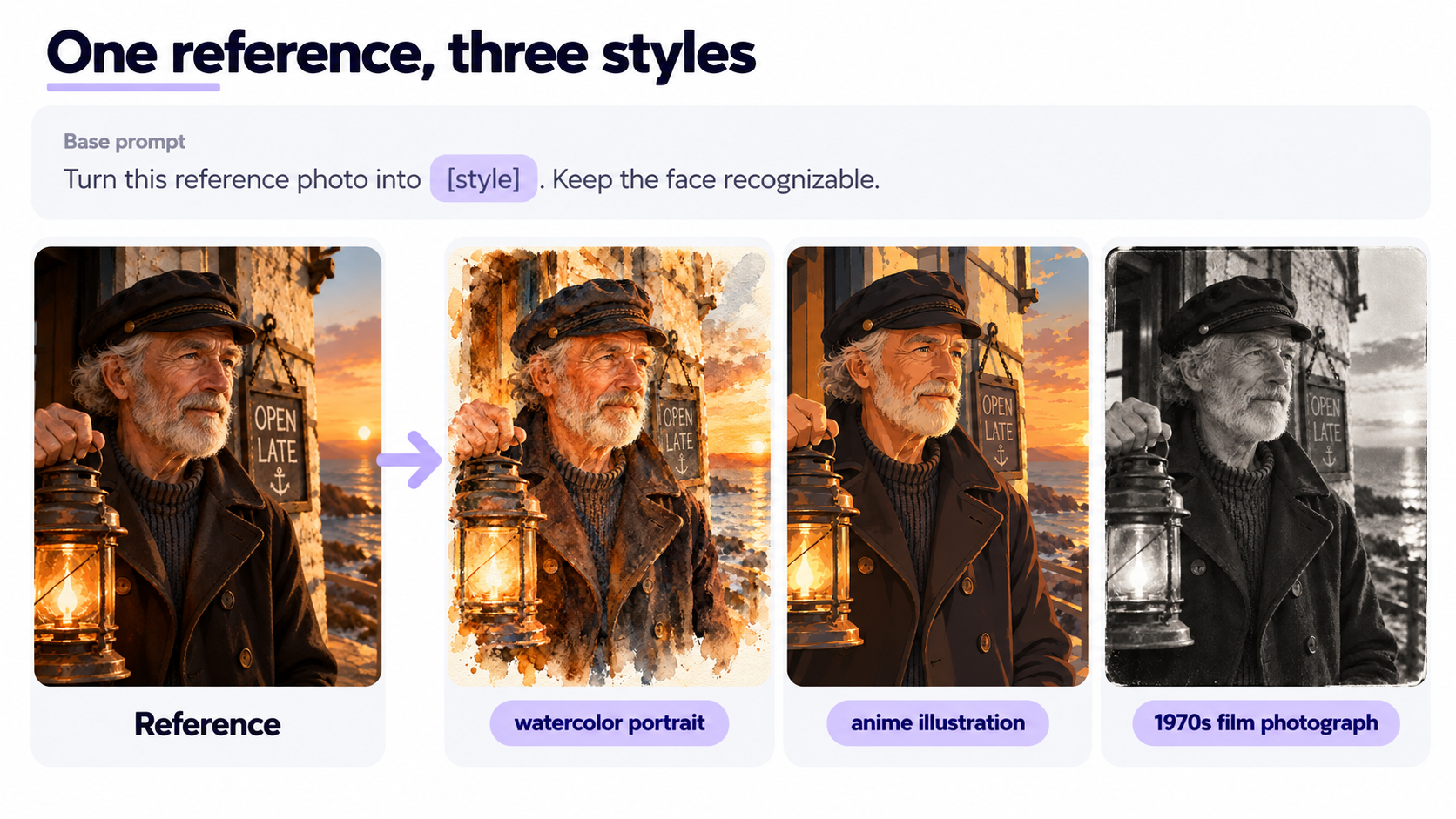
The strongest ai photo prompts that start from a reference image spell out three things: what to change, what to preserve, and the final style.
“Turn this reference photo into a watercolor portrait, amber palette, hand-painted texture. Keep the face recognizable.” That covers restyling, background replacement, and style transfer.
How do I write good ai prompts for images?
Write a one-line brief (subject, action, setting, mood), then layer style, lighting, camera angles, and palette on top. Use professional terminology (85mm lens, golden hour lighting, chiaroscuro). Kill vague words. Iterate one variable at a time. A tight 40-word prompt beats a rambling 400-word one.
How do I prompt AI for pictures if I have never done it before?
Start with a prompt from the copy-paste library, generate once, then change one word and generate again. Do that ten times and you will feel how each element changes the output.
Are AI images prompts the same across every generator?
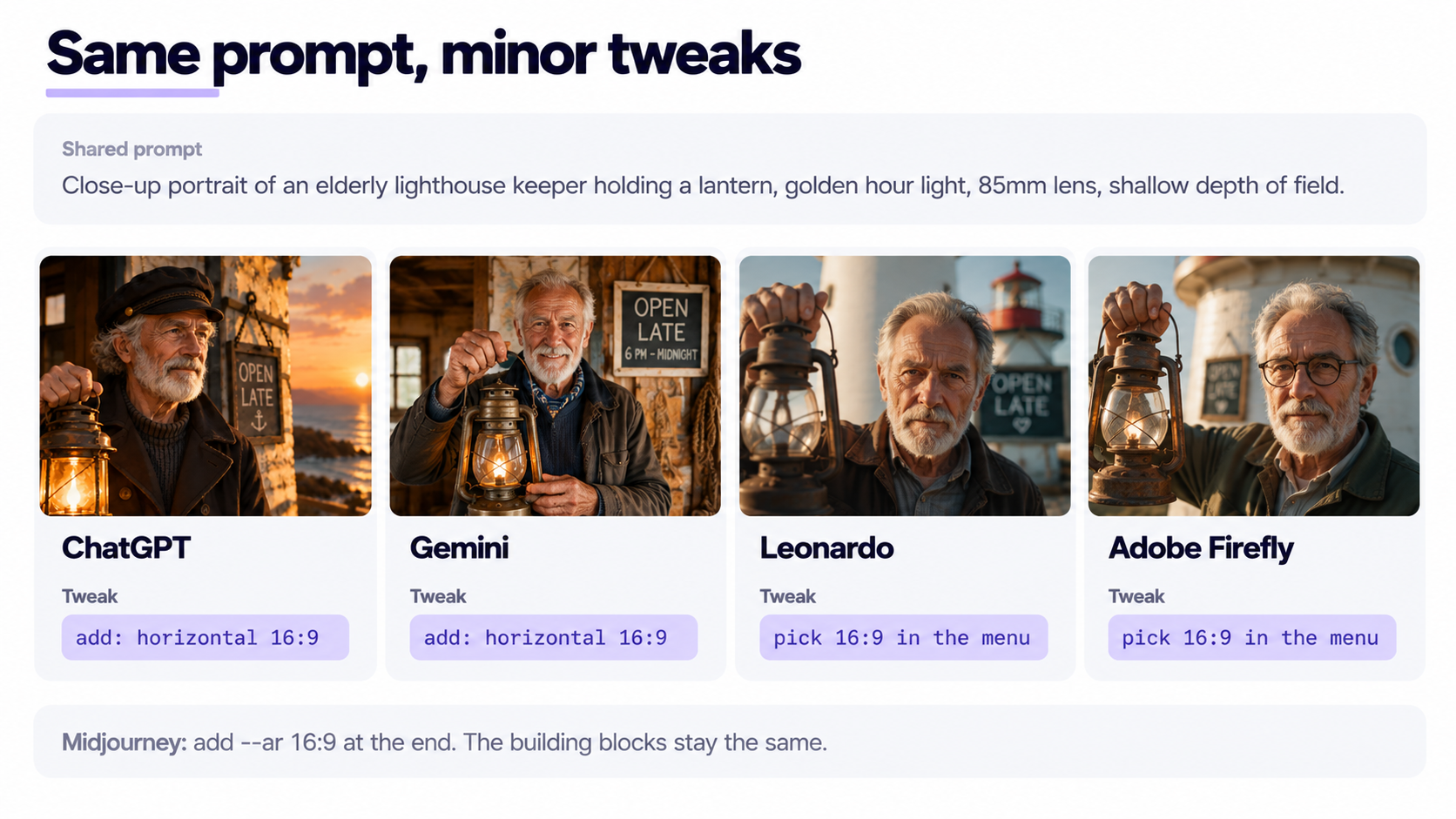
The building blocks are the same. Subject, action, setting, style, lighting, camera angles, palette work in Midjourney, DALL·E, Stable Diffusion, Firefly, and every serious generator.
Parameter syntax differs (Midjourney uses –ar 16:9, others expose aspect ratios in a menu). A natural language prompt ports across tools with minor tweaks.
Can I use AI generated images commercially?
Depends on the tool’s license, not the prompt. Adobe Firefly trains on licensed data and pitches itself as commercially safe. Midjourney and OpenAI grant commercial rights on paid tiers.
Read the current terms before publishing an ai image in a paid campaign.
What are negative prompts?
Lists of things you want the model to leave out: extra fingers, distorted faces, text, a specific color or object.
Some tools (Stable Diffusion, some Midjourney flows, several open-source apps) expose a dedicated field. Others do not, so be more precise in the positive prompt instead.
Paste any of these ai images prompts into the Eliten AI image generator and see what comes back.
Every good prompt started as a bad prompt someone was patient enough to fix.
Sources
- Midjourney, Prompt Basics (official docs): https://docs.midjourney.com/hc/en-us/articles/32023408776205-Prompt-Basics
- OpenAI Platform, Image generation guide: https://platform.openai.com/docs/guides/image-generation
- Adobe Firefly, AI image prompt examples: https://www.adobe.com/products/firefly/ai-generated-examples/image-prompts.html