
You describe images. An AI image generator paints them. Fifteen seconds later you’ve got AI images to post, print, or send a client. That’s AI image generation in 2026.
This guide covers the loop. What’s happening inside the AI models. How to pick an image generator. How to write a text prompt that gives you the AI images you pictured. What to do when the first images come back with six fingers on one hand. And how to keep iterating on AI images without wasting a whole afternoon.
The 40-second answer
To create AI images, open an AI image generator, describe your images in a text prompt (subject, setting, style, lighting), and click generate. Refine by rerunning with more detail, adjusting aspect ratio, or uploading a reference image. Free tools cover casual work. Paid plans unlock higher quality AI images and a commercial license included with the AI images.
Create your first AI image in three steps
You don’t need Photoshop or complicated software. A browser is enough.
Step 1. Open an AI image generator
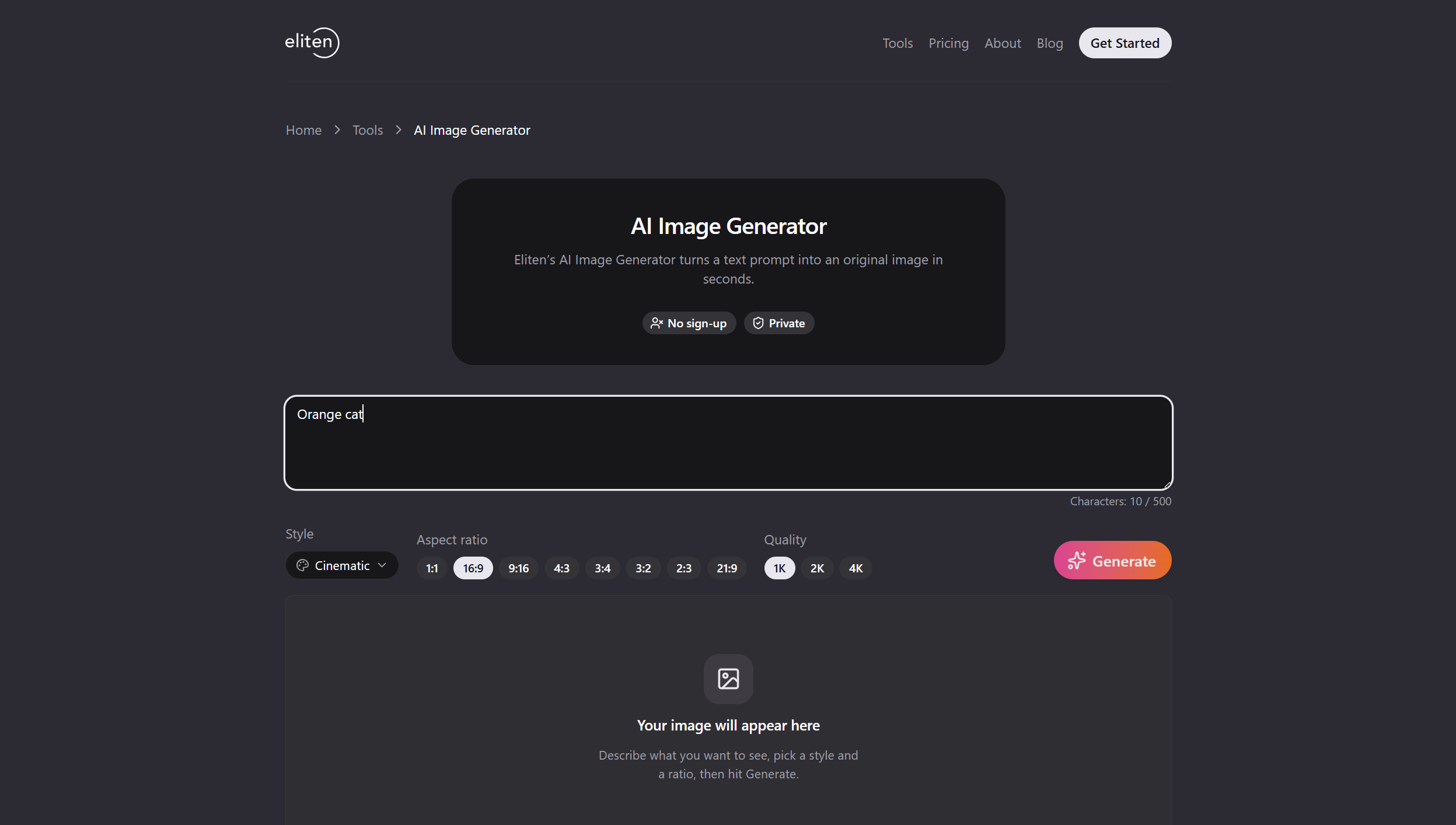
Any AI image generator will do. Eliten’s runs in the browser.
Step 2. Write a short text prompt for text to image
Describe images the way you’d describe them to a friend. Subject. Setting. Style. Lighting. Everyday language beats prompt-engineering jargon.
Paste this as your first image prompt:
An orange cat napping in a sunbeam on a white windowsill, soft afternoon light, shallow depth of field, photorealistic.
Step 3. Generate ai images and review the images generated
Hit generate. Wait fifteen to thirty seconds. You’ll get one image, sometimes multiple variations across the images generated. Don’t fall in love with the first images.
How AI image generators actually work
Modern AI image generators use diffusion. The 2020 paper that made this the dominant image generation approach by Ho, Jain and Abbeel showed how a machine learning model can learn to reverse noise addition. During training, the AI models see billions of images paired with text captions, scrambled into static, and learn to walk that process backward: static, faint shape, images.
At generation time the AI image generator starts with random noise and denoises it, guided by your whole prompt, until images emerge. It uses a latent space where related concepts sit near each other, so “orange cat” stays close to “tabby” and far from “airliner.”
Neural networks in these image models learn statistical patterns between pixels and text. Artificial intelligence, in this ai image generation context, is pattern matching at scale.
Pick an AI image generator that fits what you’re making
Different AI models are good at different things. Most AI image generators let you switch image models in one place.
Nano Banana (Google Gemini)
Google’s image model shipped in August 2025 as Gemini 2.5 Flash Image, first known as Nano Banana. Nano Banana Pro followed in November 2025 with 2K and 4K images and better text rendering. Nano Banana 2 followed for faster iteration. Strong default for speed plus real-world knowledge.
GPT image (ChatGPT and OpenAI)
OpenAI’s gpt image sits inside ChatGPT and the API. Conversational, which helps when you fine tune a text prompt. Handles concept art, mood boards, an ai photo for a post, and social posts through a text to image flow.
Adobe Firefly
Adobe Firefly is the model when licensing matters. Adobe trains Firefly on licensed Adobe Stock and public domain content and, on paid Creative Cloud plans, offers IP indemnification. Safer bet when a legal team will review the AI images. Adobe firefly spans photorealism to painterly digital art, and every image safely carries C2PA content credentials. Adobe firefly runs a text to image flow built for generating images at scale.
Stable diffusion, Flux, and open image models
Stable diffusion and Flux run locally or through hosted UIs, giving full creative control over the images if you can handle a heavier interface. Great for stylized art, digital art, ai art, and pixel art. More creative range for a steeper curve. Creative freedom is the trade for a heavier setup.
Canva AI, Pixlr, Felo, Magnific
These stack a friendly editor around swap-in AI models. Canva ai is convenient if you already live in Canva. Pixlr and Felo pack multiple image models into the same workspace so you can generate ai images from several engines side by side. Felo groups prompts and images through an artful inspiration flow.
Write a text prompt that gives you the perfect image
Prompt quality is your biggest lever. A good text prompt has four parts.
Subject
Who or what is in the image. “Orange cat.” “A woman engineer.” “A ceramic teacup.” Specific beats vague.
Setting
Where is the subject? “On a windowsill.” “In a rain-slick Tokyo alley.” “Against a matte grey product background.”
Style
Photorealistic, digital art, concept art, watercolor, isometric, stylized art. Naming an art style anchors the prompt and the AI images that follow.
Lighting and lens
Soft afternoon light. Overhead studio softbox. Golden hour. Macro lens. Shallow depth of field. Lighting gives creative range for the least effort.
Stack the four parts and you get a repeatable formula:
[Subject], [setting], [style], [lighting].
Iterate one variable at a time. Change lighting, keep the rest. Then change style. That’s how you fine tune AI generated images. Keep a swipe file of prompts that worked and remix them.
Aspect ratio and composition presets
Aspect ratio is where first-timers waste iterations generating images. Pick it before you generate ai images.
Social posts
Square (1:1) for the Instagram grid. Vertical 4:5 for feed. Vertical 9:16 for Reels, TikTok, and Stories. Sizing images correctly for social posts saves rework.
Print and posters
3:2 or 4:3 for standard prints. 2:3 vertical for posters. Target 300 DPI at final size for high resolution images that hold up in ink.
Product images
Square (1:1) for marketplaces. 4:5 for e-commerce carousels. Clean padding on all sides. Product images on a plain backdrop are the most versatile.
Push resolution and get high quality images
Default images sit at 1024 by 1024. Fine for social posts. Product images and print need more.
Upscale with a diffusion-based upscaler. Nano Banana Pro goes straight to 2K or 4K images. For high resolution images from smaller image models, upscaling adds detail rather than enlarging pixels. Follow with light noise reduction and gentle sharpening for the maximum quality look.
If a face looks plastic, drop upscale strength and generate ai images again. High quality images beat sharp-for-the-sake-of-sharp when generating images for print.
Edit AI images without starting over
Iteration on the images created is cheap. Regenerating from scratch every time wastes time.
Inpainting fixes small errors
Mask the broken bit (warped hand, smeared word) and let the AI regenerate that region. The rest of the AI images stay intact.
Outpainting extends the frame
Push the canvas out and let the model fill the rest. Portraits become wider hero images.
Reference photo for style consistency
Upload a reference image and the model matches its color palette, mood, or composition. You get variations that feel like the same shoot. One reference image drives style consistency across images better than any prompt tweak. Layer a second reference image on top to blend two looks into the AI images.
Image editing tools live in one workspace
Crop, adjust opacity, apply filters right where you generated. Photo editing inside the workspace saves round-trips. For deeper image editing, most workspaces open a dedicated panel.
Image-to-Image edits
Feed one image in and describe the change. Great for keeping a character consistent across sets.
Product images and commercial use
Product images need to look bought, not generated.
Clean single-color background. Describe lighting in commercial terms: overhead softbox, side rim light, seamless backdrop. Ask for accurate text rendering only when the product name is critical.
Check the license before commercial use. Adobe Firefly ships with commercial-use permission for its ai generated images and, on paid plans, IP indemnification. Nano Banana images from the Gemini app carry SynthID watermarks. Confirm the commercial license in your plan tier before shipping.
AI images for YouTube videos and thumbnails
Thumbnails live or die on the first half-second. Vertical framing rules on mobile YouTube. Horizontal 16:9 wins on desktop. AI images work for both.
Design for two focal points. Big face. Big word. Top-right corner clear for the runtime badge. Some tools handle video generates flows for generating images and video; for video, pick a video-first tool.
Show the text prompt on screen in walkthrough youtube videos. Best thing you can do for retention.
AI photos of yourself, headshots, and photoshoots
Selfies, portraits, and avatars are the highest-demand ai photo use case in 2026. Upload reference images, describe wardrobe and setting, and start generating images for a session of stunning images. One ai photo seeds twenty AI images.
Character consistency is the hard part. Same reference image across prompts. Lock the seed if the generator supports it. Check the data policy before you create images from your face, and only create images from photos you own.
Which AI can create images anyway?
Most mainstream assistants create images now. ChatGPT through gpt image. Gemini through Nano Banana. Copilot uses DALL-E-family ai models. Dedicated ai image generators (Firefly, Midjourney, Flux) give higher quality images and more creative control. Which ones create images best depends on your use case: the best ai image generator for licensed commercial work is not the best ai image generator for painterly digital art. Community picks change fast, so treat any list as a snapshot.
Compare the best AI image generator options
| AI image generator | Best for | Text to image | Commercial use | Free plan |
|---|---|---|---|---|
| Eliten AI image generator | Fast in-browser image generation | Yes | Check plan | 7-day trial |
| Nano Banana (Gemini) | Speed and world knowledge | Yes | Check plan | Limited |
| Nano Banana Pro | 2K/4K text to image | Yes | Check plan | Limited |
| GPT image (ChatGPT) | Conversational refinement | Yes | Check plan | Limited |
| Adobe Firefly | Commercially safe outputs | Yes | Yes on paid plans | Yes |
| Stable diffusion / Flux | Local and open workflows | Yes | Depends on model | Free open weights |
Troubleshoot when AI images go wrong
Weird hands, garbled ai text, plastic skin on the images. Two-step fixes usually work.
Hands and fingers look wrong
Regenerate with an inpainting mask over the hand. Or add “detailed hands, five fingers, natural anatomy” to the prompt and rerun.
Text in the image is nonsense
For accurate text rendering, use an image model built for it (Nano Banana Pro and gpt image are strongest for this image generation task). Or generate the images without text and layer text after.
Character consistency drifts across a set
Keep one reference photo. Lock the seed. Change one variable per iteration. AI models struggle when too many things change at once.
The model refuses to generate
Every AI image generator has a safety layer that will refuse to generate inappropriate content. Working as designed. Reword the prompt or pick a stock photo.
Watermarks, provenance, and AI generated art
Most 2026 AI image generators embed provenance in the images. Nano Banana carries SynthID and C2PA content credentials. OpenAI’s tools add C2PA metadata plus SynthID. Matters when you publish AI generated art or AI generated artwork on platforms that flag AI images.
How many images can you generate in a session
How many images per session depends on the ai image generator, plan tier, and image model. Free plans cap at a handful of AI images per day. Paid plans lift the ceiling on generating images. On unlimited tiers the only limit is patience.
Quick start: create AI images today
Pick an AI image generator. Write a one-line prompt. Generate images. Change one word. Keep generating images. Do that ten times and you’ll have a feel for what your generator wants.
Start in Eliten’s AI image generator and paste the prompt. Or open the workspace directly.
FAQ
Yes. Most mainstream free ai image generator options, including Nano Banana in the Gemini app, gpt image in ChatGPT, and Adobe Firefly, let you create ai images without paying. Free ai image generator plans cap daily images, resolution, and sometimes commercial use, but for first images or a few social posts, free ai images are enough.
Open an AI image generator, type a text description (subject, setting, style, lighting), pick an aspect ratio, and generate ai images. Iterate. Change one variable, generate again. Once you have images that are close, use inpainting to fix errors, outpainting to extend the frame, and a reference image to keep style consistent.
ChatGPT handles text to image through gpt image and the DALL-E family of ai models. Describe the images in natural language and ChatGPT returns them. Free ChatGPT accounts generate images with daily caps. Paid tiers raise limits and unlock higher quality images.
AI image generators with truly free tiers exist, but “100% free” with no limits is rare. Adobe Firefly and Nano Banana work without payment. Eliten runs a 7-day trial. Expect a daily cap on any free tier. For unlimited image generation plus commercial use, a paid tier is the path.
Now paste the prompt and generate images.
Sources
- Ho, J., Jain, A., Abbeel, P. (2020). “Denoising Diffusion Probabilistic Models.” NeurIPS 33. https://arxiv.org/abs/2006.11239
- Google DeepMind. “Nano Banana Pro: Gemini 3 Pro Image model.” https://blog.google/technology/google-deepmind/nano-banana-pro/
- Google. “Nano Banana 2 (Gemini 3.1 Flash Image).” https://blog.google/products/gemini/nano-banana-2/
- TechCrunch. “Google releases Nano Banana Pro.” (November 20, 2025). https://techcrunch.com/2025/11/20/google-releases-nano-banana-pro-its-latest-image-generation-model/
- Adobe. “Adobe Firefly FAQ.” https://helpx.adobe.com/firefly/web/get-started/learn-the-basics/adobe-firefly-faq.html
- OpenAI. “Advancing content provenance for a safer, more transparent AI ecosystem.” https://openai.com/index/advancing-content-provenance/